Choosing your first soldering station can feel complicated when kits vary widely in wattage, controls, included tools, and temperature stability. The right setup should make learning easier without limiting you as your projects become more ambitious.
We compared 10 soldering stations for beginners, from straightforward digital irons to hot-air rework systems. The guide below explains what matters most, which features are worth paying for, and how to match a station to your projects.
Best 10 Soldering Station for Beginners Picks for 2026
Best Beginner Kit
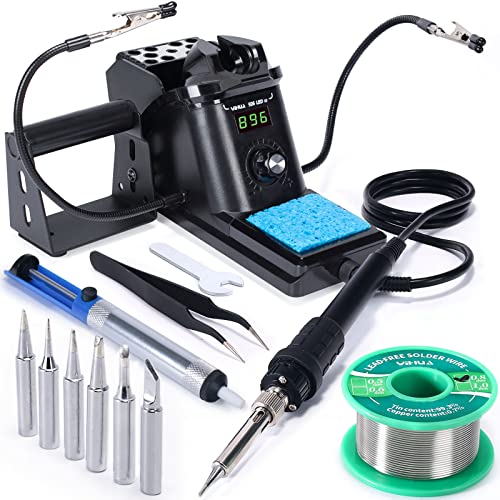
- Adjustable 194°F–896°F temperature range
- Includes helping hands, six tips, and solder
- Sleep mode and digital calibration
Best For: New users wanting a complete starter setup
Best Premium Pick

- Intuitive rotary temperature control
- 100-watt station rated to 899°F
- Includes holder, cleaner, sponge, and tip
Best For: Beginners seeking a focused, established-brand station
Best Workstation Bundle
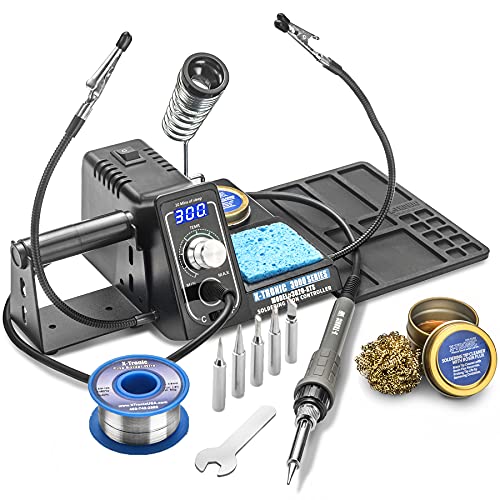
- Heats to working temperature in under 30 seconds
- Includes mat, helping hands, tips, and solder
- 3-year warranty and lifetime support noted
Best For: Beginners building a supported electronics workspace
Best Ergonomic Option

- 15-second heat-up from 212°F to 650°F
- Comfortable molded pencil-grip iron
- Includes three tips and helping hands
Best For: Beginners prioritizing comfort and quick startup
Best Complete Beginner Kit
3060-PRO 75W Soldering Station

- 16-piece accessory bundle with helping hands and magnifier
- Three presets, sleep timer, and dual temperature readouts
- ESD-safe design with three-year warranty and lifetime support
Best For: Beginners wanting a ready-to-use workstation
Best Straightforward Upgrade
Weller WE1010NA Digital Station
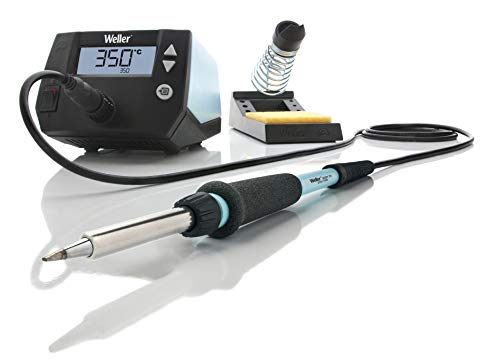
- 70W iron with ergonomic handle and silicone cable
- Stable temperature control with lock and LCD display
- Standby, auto setback, and password-protection features
Best For: Beginners who prefer a focused, established-brand station
Best Space-Saving High-Power Kit
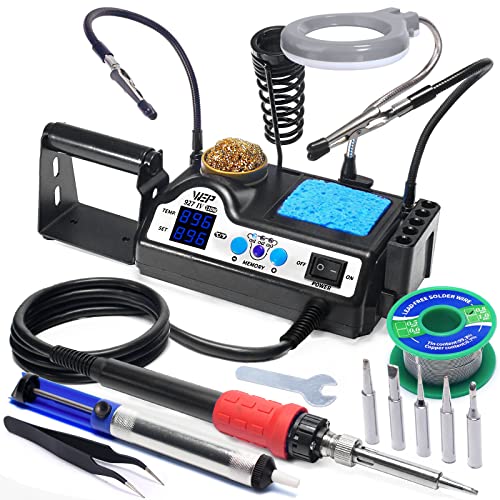
- 110W heating element with 194°F–896°F range
- Three presets, sleep mode, and dual temperature display
- Built-in magnifier, helping hands, dispenser, and tip storage
Best For: Beginners with limited bench space who want integrated tools
Best Overall
YIHUA 939D+ Digital Soldering Station

- Precise digital temperature control
- Durable metal construction
- Includes tip-cleaning accessories
Best For: Beginners starting electronics, repairs, and recurring hobby projects
Most Versatile
YIHUA 8786D I 2-in-1 Rework Station

- Combines iron and hot air rework
- Includes 10 tips and 4 nozzles
- Adds ESD and fail-safe features
Best For: Beginners learning electronics repair and hot air rework
Best Starter Kit
100W Digital Station with Helping Hands

- Includes helping hands and core tools
- 356°F–896°F digital temperature range
- Adjustable automatic sleep mode
Best For: Beginners building an affordable, ready-to-use workbench
Best Beginner Kit – YIHUA 926 III
The YIHUA 926 III is a practical soldering station for beginners who want an adjustable digital iron plus a broad set of starter accessories. Its compact design, temperature display, helping hands, and included desoldering tools make it suitable for learning common soldering and repair tasks.
Best For: New users who want an all-in-one kit with useful accessories and straightforward digital controls.
Pros:
- Fast heating with a 194°F–896°F adjustable temperature range and PID stabilization.
- Includes two helping hands, six tips, lead-free solder, a solder sucker, tweezers, and cleaning supplies.
- Offers Celsius/Fahrenheit conversion, adjustable sleep mode, and digital temperature calibration.
- Compact station includes tip storage and a protective rear mesh.
Cons:
- Designed for 110–127V operation with a US-standard plug.
- The kit’s many accessories may be more than users need for simple projects.
For beginners building a first workstation, the 12-in-1 package provides strong practical value. The included 12-month US manufacturer technical coverage and 24/7 assistance add useful support for new users.
Best Premium Pick – Hakko FX888DX
The Hakko FX888DX is a focused soldering station for beginners who prefer a recognized station design over a large accessory bundle. Its rotary encoder simplifies temperature adjustment, while the 100-watt output and included holder, sponge, cleaner, and chisel tip provide the essentials for getting started.
Best For: Beginners who value simple controls and a dedicated station from an established soldering brand.
Pros:
- Rotary encoder provides an intuitive method for adjusting temperature.
- 100-watt station reaches an upper temperature rating of 899°F.
- Includes an iron holder, sponge, tip cleaner, user manual, and T18-D16 chisel tip.
- Specified temperature stability is ±1.8°F.
Cons:
- Includes fewer accessories than the bundled starter kits in this roundup.
- The supplied information lists no manufacturer warranty.
The FX888DX is a good choice when ease of adjustment and station-focused design matter more than extras. Beginners may need to purchase additional tips or solder separately depending on their projects.
Best Workstation Bundle – X-Tronic 3020-XTS
The X-Tronic 3020-XTS is a versatile soldering station for beginners who want workspace support built into the kit. It combines a 75-watt quick-temperature unit with two helping hands, a silicone tool mat, multiple tips, solder, and tip-cleaning supplies.
Best For: Beginners who want a broad workstation bundle for small PCB and electronics projects.
Pros:
- Heats from 200°C to 480°C in less than 30 seconds.
- Includes two helping hands, a silicone tool mat, five extra tips, and 50g of lead-free solder.
- Features PID temperature compensation, a 10-minute sleep timer, and Celsius/Fahrenheit switching.
- Includes a 3-year warranty and lifetime support according to the supplied notes.
Cons:
- The product documentation notes a California chemical warning involving lead exposure.
- The kit’s larger accessory set may require more storage space.
With its mat, helping hands, and consumables, the 3020-XTS can reduce the number of separate purchases for a beginner. Its quick heat-up and sleep timer also make it convenient for repeated practice sessions.
Best Ergonomic Option – Weller 70W Digital Station
The Weller 70W Digital Station is a straightforward soldering station for beginners who want quick startup and comfortable handling. It includes a molded pencil-grip iron, integrated safety rest, three tips, helping hands, and controls for temperature presets, Fahrenheit/Celsius display, and standby mode.
Best For: Beginners who prioritize ergonomic handling, fast heat-up, and basic safety features.
Pros:
- Heats from 212°F to 650°F in 15 seconds.
- Ergonomic molded pencil-grip is designed for comfortable use.
- Includes three tips, an iron holder, and helping hands.
- Offers temperature presets, standby mode, and Fahrenheit/Celsius adjustment.
Cons:
- Its listed lower temperature rating is 350°F, offering less low-temperature range than some alternatives.
- The included accessories are more limited than those in the larger kit-style options.
The Weller is a sensible pick for beginners who want a clean, uncomplicated setup rather than a large accessory assortment. Its quick heat-up and integrated safety rest make it convenient for routine practice and small repairs.
Best Complete Beginner Kit – 3060-PRO 75W Soldering Station
For beginners seeking a soldering station for beginners that includes nearly everything needed to start, the X-Tronic 3060-PRO is a well-equipped option. It combines a 60W soldering iron with a 15W mini motherboard, adjustable temperature control, preset memories, and a broad accessory set for hands-on projects.
Best For: Beginners who want an all-in-one kit with magnification, component support, and desoldering accessories.
Pros:
- Includes five extra tips, solder, tweezers, a solder sucker, helping hands, and a mini magnifying lamp.
- Offers a 194°F–896°F temperature range, three presets, dual temperature readouts, and adjustable sleep timing.
- Features ESD-safe design, a flexible silicone cable, digital calibration, and a three-year warranty with lifetime support.
Cons:
- The large accessory bundle may take more workspace than a basic station.
- It is designed for 110V/60Hz use and is not available in a 220V version.
- The product warning notes potential exposure to lead and other listed chemicals.
The 3060-PRO is a strong choice when convenience matters more than minimalism. Its controls are approachable for new users, while the included tools reduce the need for immediate add-on purchases.
Best Straightforward Upgrade – Weller WE1010NA Digital Station
The Weller WE1010NA is a practical soldering station for beginners who prefer a focused setup from an established brand. Its 70W iron, LCD display, temperature stability, and intuitive controls provide the core features needed for learning without an oversized accessory bundle.
Best For: Beginners who value dependable temperature control, an ergonomic iron, and a simple branded setup.
Pros:
- 70W power is rated as 40% more powerful than the two models it replaces.
- Provides temperature stability of ±4°F/2°C and temperature lock to help protect tips and components.
- Includes standby mode, auto setback, password protection, an ESD-safe station, and a heat-resistant silicone cable.
Cons:
- The package includes fewer accessories than the more comprehensive kits in this roundup.
- Its stated upper temperature rating is 400°F, limiting the listed range compared with the other options.
- The manufacturer warranty is one year.
Choose the Weller when consistent operation and straightforward controls are more important than bundled extras. It is a tidy starting point for basic electronics work and a sensible platform for developing technique.
Best Space-Saving High-Power Kit – WEP 927-IV 110W Station
The WEP 927-IV is a soldering station for beginners who want fast heating and built-in organization in a compact footprint. Its 110W heating element, dual numerical display, preset channels, magnifier, helping hands, and storage features make it suited to learners working on a space-conscious bench.
Best For: Beginners who need high power, integrated workholding, and organized storage in a compact station.
Pros:
- The 110W heating element is designed to heat quickly across a 194°F–896°F range.
- Three preset channels, a dual temperature display, and adjustable sleep timing simplify repeated work.
- Integrates a magnifier with LED lights, two helping hands, a solder dispenser, tip storage, and cleaning tools.
Cons:
- It uses WEP #1400 replacement tips, so tip compatibility is more specific.
- The station is rated for 110–127V USA specifications and should not be connected to 220V power.
- Support is listed as one-year USA technical assistance rather than a longer product warranty.
The 927-IV stands out for combining power and bench organization in one compact design. It is especially appealing for beginners who want built-in assistance tools and quick access to frequently used settings.
Best Overall – YIHUA 939D+ Digital Soldering Station
For beginners who want a dependable soldering station for beginners that can also support regular hobby and repair work, the YIHUA 939D+ offers precise digital temperature control, a durable metal build, and a straightforward adjustment knob. Its 392°F to 896°F range suits a variety of electronics and DIY projects.
Best For: Beginners who want a sturdy, precise station for electronics, repairs, school labs, and recurring hobby use.
Pros:
- Digital display with easy °F/°C switching and precise temperature adjustment.
- Built-in transformer provides contact-safe voltage while retaining high power performance.
- Metal control panel and stand-alone iron holder are designed for durability and heat resistance.
- Includes a brass tip cleaner, sponge, and detachable 907F soldering iron.
Cons:
- Its more professional-oriented design may be more station than occasional users need.
- Designed for 110–127V operation with a US-standard plug.
The YIHUA 939D+ is a strong long-term choice if you value temperature stability and a solid workspace setup over the lowest-cost starter kit. Its 12-month US manufacturer technical coverage and 24/7 assistance add reassurance for new users.
Most Versatile – YIHUA 8786D I 2-in-1 Rework Station
The YIHUA 8786D I is a flexible soldering station for beginners who expect to work beyond basic through-hole soldering. It combines a conventional soldering iron with a hot air rework station, giving you tools for soldering, component removal, and other electronics repair tasks in one unit.
Best For: Beginners interested in electronics repair, hot air rework, and a broader selection of included accessories.
Pros:
- Combines soldering iron and hot air functions in one station.
- Includes 10 soldering tips, four hot air nozzles, a desoldering pump, and an IC extractor.
- PID temperature control is designed to monitor and correct temperature quickly.
- ESD-safe design and fail-safe hot-air protection support safer component work.
Cons:
- Its dual-function design may be more complex than a basic iron-only station.
- The larger accessory and hot-air setup can take more workspace.
- Designed for 110–127V operation with a US-standard plug.
Choose this model if learning hot air rework is part of your plan. The included tips, nozzles, solder, and desoldering tools reduce the need to buy a separate accessory set, although the added functions may be unnecessary for simple beginner projects.
Best Starter Kit – 100W Digital Station with Helping Hands
This 100W kit is a practical soldering station for beginners because it pairs a digital temperature-controlled iron with accessories that make early projects easier to set up. The included helping hands, solder wire, tips, pump, tweezers, and cleaners provide a broad starting collection for circuit boards, crafts, and household repairs.
Best For: Beginners who want an all-in-one kit with helping hands and basic soldering accessories.
Pros:
- Fast-heating 100W station with a 356°F to 896°F adjustable range.
- Automatic sleep mode can be set from 0 to 600 seconds to reduce idle heating.
- Includes two helping hands, five tips, solder wire, a solder sucker, tweezers, and cleaning tools.
- Compact design helps conserve workspace and supports °C/°F switching.
Cons:
- The supplied product information does not specify a manufacturer name or warranty coverage.
- Its included accessories are convenient but may be less specialized than a dedicated rework station’s tools.
For someone assembling a first workbench, this kit offers useful extras rather than just the iron and stand. The helping hands are particularly practical for holding small parts, while adjustable sleep timing adds a useful safety and energy-saving feature.
How We Picked the Best Soldering Station for Beginners
We focused on the features that have the greatest effect on learning, consistency, and long-term usefulness: temperature control, heating performance, ergonomics, tip availability, safety features, and included accessories. We also considered whether each station suits basic electronics, wire work, circuit-board repairs, hobby projects, or more advanced rework.
Starter kits received extra consideration when their accessories are genuinely useful, such as brass wool, solder suckers, helping hands, spare tips, magnifiers, and silicone mats. A large accessory bundle is not automatically better, however; stable heat and comfortable handling matter more than a crowded box.
Quick Comparison
| Feature | What to look for | Why it matters |
|---|---|---|
| Power | About 60W to 100W | Supports faster heat recovery on larger joints and ground planes. |
| Temperature range | Roughly 350°F to 900°F | Provides flexibility for electronics, connectors, and lead-free solder. |
| Controls | Digital display, dial, or presets | Makes repeatable settings easier for beginners. |
| Tips | Replaceable, commonly available tips | Lets you choose the right shape and replace worn tips affordably. |
| Safety | Sleep mode, insulation, and ESD protection | Reduces accidental damage and helps protect components. |
Key Buying Factors for a Soldering Station for Beginners
Temperature Control and Heat Recovery
Adjustable temperature is more useful than simply choosing the highest wattage. Look for a station that reaches temperature quickly and recovers heat promptly after contacting a joint. Digital displays and preset channels can make repeated work easier, while a responsive dial may be perfectly adequate for simple projects.
Iron Comfort and Tip Selection
A lightweight handpiece with a flexible cable helps you work accurately for longer periods. Beginners should have access to at least a fine conical or needle tip, a chisel tip for general joints, and replacement tips that are easy to find. Use the smallest tip that transfers enough heat; extremely fine tips are not always best for larger connections.
Useful Accessories
Helping hands, a stable stand, brass tip cleaner, solder, tweezers, and a solder sucker can reduce the need for additional purchases. A magnifier is helpful for small work, but it should not substitute for good lighting and a clear workspace. Hot-air attachments are valuable when you expect to handle surface-mount components, but they add complexity and cost.
Safety and Workspace Requirements
Use a heat-resistant mat, eye protection, ventilation, and a secure iron stand. Sleep mode is a worthwhile convenience and safety feature, especially if you are learning or frequently pause between joints. Confirm the station’s voltage and plug configuration before buying.
Who Should Buy Which Soldering Station for Beginners?
Choose a simple digital station if you are learning through basic electronics, model making, wire repairs, or occasional DIY projects. It offers the clearest balance of control, price, and ease of use. A higher-powered 70W to 110W model is better for frequent work, thicker wires, connectors, or boards that draw heat away quickly.
If you value an established repair-focused brand and broad accessory availability, consider a Hakko or Weller option. If you want the most tools in one package, a kit with helping hands, spare tips, solder, and cleaning supplies may be the better value. For surface-mount repair and component removal, choose the two-in-one hot-air and soldering station, but expect a steeper learning curve and a larger footprint.
Whichever model you select, start with moderate temperatures, practice on inexpensive components, and keep the tip clean and tinned. Those habits will improve results more than maximum wattage or a long list of included accessories.