When it comes to diagnosing vehicle issues, having the right OBD2 scan tool with live data can make a significant difference. These tools not only read and clear fault codes but also provide real-time information that helps you understand what’s really going on under the hood. As you explore the top options available, you’ll find features that cater to both DIY enthusiasts and professionals alike. Which tools stand out the most regarding reliability and functionality?
FOXWELL NT301 OBD2 Scanner Diagnostic Code Reader Tool

The FOXWELL NT301 OBD2 Scanner is the perfect choice for DIY enthusiasts and professional mechanics alike who need a reliable tool for vehicle diagnostics. This diagnostic tool reads DTCs, accesses emissions readiness status, and turns off the check engine light. You can also reset monitors and read live data, making it versatile for most vehicles, including cars and light trucks. While it excels in reading and clearing fault codes, it doesn’t support certain systems like ABS or SRS. With user-friendly features like hotkeys and a color screen, it’s designed for straightforward vehicle diagnostics right from the OBD2 port.
Best For: DIY enthusiasts and professional mechanics seeking a reliable and user-friendly vehicle diagnostic tool.
Pros:
- Easy to use with hotkeys for read/erase and I/M readiness.
- Compatible with most vehicles, including 1996 US-based and 2000 EU-based models.
- Lifetime updates and a 1-year seller assurance with dedicated tech support.
Cons:
- Does not support advanced systems such as ABS, SRS, or TPMS.
- Limited to reading and clearing fault codes only, lacking special functions like oil reset or programming.
- Requires the vehicle to have the check engine light illuminated for accurate code reading.
ANCEL AD310 OBD II Scanner Car Engine Fault Code Reader

For those looking to tackle common car issues without needing extensive automotive knowledge, the ANCEL AD310 OBD II Scanner stands out as an ideal choice. This compact and durable tool reads and clears diagnostic trouble codes for vehicles from 1996 or newer, displaying live data and vehicle information. With a sturdy design and a 2.5-foot cable, it’s portable and user-friendly, making it perfect for anyone. Plus, it supports all OBDII protocols, ensuring broad compatibility. While it primarily focuses on emission-related issues, it delivers fast, accurate results, allowing you to diagnose problems quickly and efficiently.
Best For: Individuals seeking a user-friendly tool to diagnose common car issues without needing extensive automotive knowledge.
Pros:
- Compact and portable design for easy transport.
- Supports all OBDII protocols, ensuring compatibility with a wide range of vehicles.
- Fast and accurate results for diagnosing emission-related issues.
Cons:
- Limited to diagnosing emission-related fault codes; cannot read engine codes unrelated to emissions.
- Does not support OBDI vehicles, even with an OBDII adapter.
- Lacks advanced features found in more expensive scanners.
FOXWELL NT604 Elite OBD2 Car Scanner

If you’re a car owner seeking a reliable and user-friendly diagnostic tool, the FOXWELL NT604 Elite OBD2 Car Scanner is an excellent choice. This 5-in-1 scanner diagnoses ABS, SRS, engine, and transmission issues right out of the box. With features like live data streaming and a built-in DTC library, it’s perfect for quick and accurate analysis. The AUTOVIN menu simplifies vehicle identification, and it supports over 60 makes without extra fees. Plus, its durable design protects against damage during transport. Just keep in mind, it doesn’t support service functions like oil resets or ABS bleeding.
Best For: Car owners looking for a reliable and easy-to-use diagnostic tool for diagnosing ABS, SRS, engine, and transmission issues.
Pros:
- User-friendly interface with quick vehicle identification through the AUTOVIN menu.
- Supports over 60 car makes globally without additional software fees.
- Durable design with a protective case that prevents damage during transport.
Cons:
- Does not support maintenance functions like oil resets or ABS bleeding.
- Compatibility varies by vehicle make, model, and year, requiring verification before purchase.
- Fault codes can only be reset after the underlying issues are resolved.
Innova 5210 OBD2 Scanner & Engine Code Reader

Combining OBD2 scanning and battery testing, the Innova 5210 OBD2 Scanner & Engine Code Reader is perfect for DIY enthusiasts and professional mechanics alike. It reads and clears check engine and ABS codes, ensuring your vehicle runs smoothly. You’ll appreciate access to live data, including RPM and engine temperature, helping you diagnose issues effectively. Plus, its oil light reset function makes maintenance easy. Compatible with most vehicles from 1996 and newer, you can trust its versatility. Enhance your experience with the RepairSolutions2 app for verified fixes and detailed repair guidance, making vehicle diagnostics straightforward and efficient.
Best For: The Innova 5210 OBD2 Scanner & Engine Code Reader is best for DIY enthusiasts and professional mechanics seeking a reliable and versatile diagnostic tool.
Pros:
- Comprehensive Diagnostics: Reads and clears check engine and ABS codes, providing essential data for vehicle maintenance.
- Live Data Access: Offers real-time data on RPM, engine temperature, and more, aiding in accurate troubleshooting.
- User-Friendly App Integration: The RepairSolutions2 app enhances the experience with verified fixes and detailed repair guidance.
Cons:
- Variable Coverage: Compatibility for ABS and engine trouble codes may vary by vehicle, requiring verification.
- Limited Advanced Features: May not offer as many advanced functions as higher-end scanners used by professional mechanics.
- No Subscription-Free Access to All Features: Some features may require additional purchases or subscriptions through the app.
OBD2 Scanner Diagnostic Tool for All OBDII Cars Since 1996

The OBD2 Scanner Diagnostic Tool is an ideal choice for vehicle owners and technicians looking for a reliable and thorough solution for diagnosing issues in OBDII cars manufactured since 1996. It’s compatible with 98% of vehicles and supports ten languages, ensuring accessibility for many users. With features like a 35,901 DTC lookup library, live data stream, and onboard monitoring, you’ll easily read and clear codes, view freeze frame data, and test components. Its compact design makes it portable, while lifetime free upgrades keep your tool current. Plus, the printing function helps you manage and document your diagnostics effectively.
Best For: Vehicle owners and technicians seeking a reliable and comprehensive diagnostic tool for OBDII cars manufactured since 1996.
Pros:
- Wide compatibility with 98% of vehicles since 1996, supporting multiple languages for diverse users.
- Extensive DTC lookup library with 35,901 codes, offering more diagnostic data than standard models.
- Compact and portable design with lifetime free updates, ensuring long-term usability and convenience.
Cons:
- May not support some very new vehicles or specific models not covered under OBDII standards.
- Limited advanced features compared to higher-end professional diagnostic tools.
- Requires a computer connection for printing functions, which may not be convenient for all users.
ANCEL AD410 Enhanced OBD2 Scanner for All OBDII Cars

For car enthusiasts and everyday drivers alike, the ANCEL AD410 Enhanced OBD2 Scanner stands out as an essential tool for anyone needing reliable vehicle diagnostics. Compatible with all OBDII vehicles, including 1996 US-based and 2000 EU-based models, it offers quick reading and clearing of emissions-related fault codes. With over 42,000 built-in DTC lookups, identifying issues is a breeze. The 2.4-inch TFT display and intuitive interface guarantee you get clear results fast. Plus, it supports advanced diagnostics, like O2 sensor testing, optimizing fuel efficiency. Backed by a decade of experience, ANCEL continuously improves its products, guaranteeing you stay updated.
Best For: The ANCEL AD410 Enhanced OBD2 Scanner is best for car enthusiasts and everyday drivers seeking reliable and efficient vehicle diagnostics.
Pros:
- Quick reading and clearing of emissions-related fault codes with over 42,000 built-in DTC lookups.
- User-friendly 2.4-inch TFT display and intuitive interface for easy navigation.
- Supports advanced diagnostics including O2 sensor and EVAP system testing to optimize fuel efficiency.
Cons:
- Cannot reset fault codes without resolving the underlying issue first.
- Updates are only compatible with Windows operating systems, not Mac.
- Does not include a battery or charger, relying solely on the vehicle’s OBDII connector for power.
BlueDriver Bluetooth Pro OBDII Scan Tool for iPhone & Android

If you’re looking for a powerful yet user-friendly diagnostic tool, the BlueDriver Bluetooth Pro OBDII Scan Tool is ideal for both DIY enthusiasts and professional mechanics alike. This tool connects wirelessly to your smartphone, allowing you to diagnose over 7,000 issues in all gas vehicles from 1996 onward. You can read and clear trouble codes, including ABS and airbag alerts, while enjoying real-time health monitoring of your vehicle. Plus, with unlimited access to repair reports and a large database of instructional videos, you’ll have everything you need at your fingertips, all without any subscription fees or hidden costs.
Best For: DIY enthusiasts and professional mechanics seeking an efficient and user-friendly vehicle diagnostic tool.
Pros:
- No subscription fees and compatible with all gas vehicles from 1996 onward.
- Provides enhanced diagnostics and unlimited repair reports, including possible causes and fixes.
- Offers real-time health monitoring and a user-friendly app for both iOS and Android.
Cons:
- Limited to gas vehicles only, excluding diesel or hybrid models.
- May require a smartphone for full functionality, which could be a barrier for some users.
- Wireless connectivity may be less reliable in certain environments compared to wired options.
BluSon YM319 OBD2 Scanner Diagnostic Tool

Engine enthusiasts and everyday drivers alike will appreciate the BluSon YM319 OBD2 Scanner Diagnostic Tool for its robust diagnostic capabilities. It reads and clears engine fault codes, helping you identify issues fast. With a built-in database of over 63,000 codes, precise diagnostics are at your fingertips. Plus, it monitors engine performance with freeze frame data and advanced diagnostics for O2 sensors and EVAP systems. The one-click BAT feature tracks battery health, preventing unexpected failures. The user-friendly design includes a 2.4 HD color screen and customizable shortcuts, ensuring efficient operation. Compatible with most vehicles and available in multiple languages, it’s a must-have tool.
Best For: Car enthusiasts and everyday drivers looking for an efficient and reliable diagnostic tool to monitor engine performance and identify issues quickly.
Pros:
- Comprehensive Diagnostics: Built-in database of over 63,000 fault codes for precise troubleshooting.
- User-Friendly Design: Features a 2.4 HD color screen and customizable shortcut keys for enhanced efficiency.
- Battery Health Monitoring: One-click BAT feature helps prevent unexpected battery failures by continuously monitoring health status.
Cons:
- Limited Functionality: Only supports reading engine fault codes, not ABS, SRS, or transmission systems.
- No Printer Required: While it has cloud printing, it does not include a physical printer for instant reports.
- Compatibility Restrictions: May not support all vehicle makes and models, particularly older or specialized vehicles.
OBD2 Scanner Bluetooth Wireless Auto Diagnostic Tool for iOS & Android
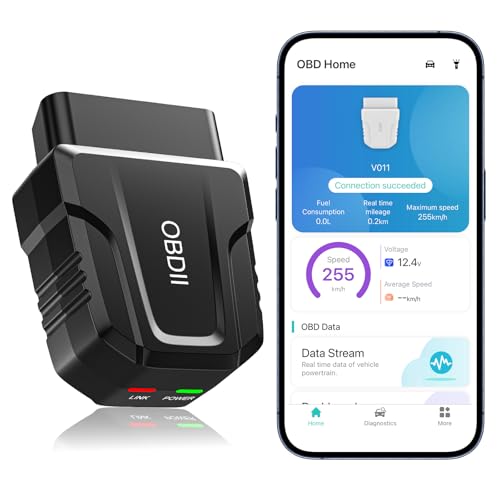
The V011 OBD2 Scanner Bluetooth Wireless Auto Diagnostic Tool is ideal for both car enthusiasts and everyday drivers who want to take charge of their vehicle’s health. It supports 9 protocols, enabling fast readings of DTCs, live data, and diagnostic reports. With its user-friendly app, you can interpret check engine lights and avoid costly repair shop visits. The clear data visualizations make it easy to monitor critical engine parameters. Compatible with over 96% of vehicles and featuring Bluetooth 5.4 connectivity, the V011 guarantees a reliable connection for both iOS and Android devices, enhancing your diagnostic experience.
Best For: The V011 OBD2 Scanner is best for car enthusiasts and everyday drivers seeking to independently monitor and diagnose their vehicle’s health.
Pros:
- Comprehensive diagnostic features supporting 9 protocols for effective fault clearing and live data monitoring.
- User-friendly app that interprets check engine lights and helps reduce repair costs by suggesting fixes.
- Broad compatibility with over 96% of vehicles, ensuring accessibility for a wide range of users.
Cons:
- Fault codes can only be cleared after repairs, which may require users to visit a mechanic for verification.
- Users must unplug the device after use to conserve the car’s battery, which may be inconvenient.
- Limited functionality may exist for very new vehicle models or specific brands not covered by the scanner.
Innova SD35 OBD2 Scanner – All System Diagnostics
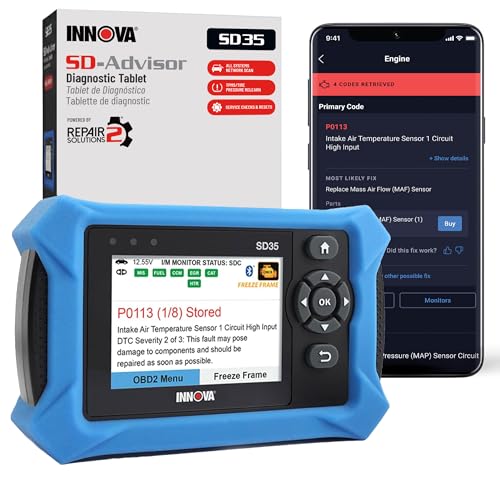
For car enthusiasts and DIY mechanics seeking thorough vehicle diagnostics, the Innova SD35 OBD2 Scanner stands out with its ability to read and clear codes from multiple systems, including ABS, SRS, and TPMS. This advanced tool scans all critical systems—engine, transmission, and more—while providing real-time live data like RPM and oxygen sensor performance. Its user-friendly, tablet-based design with a high-resolution display makes diagnostics faster and easier. Plus, you can perform essential service functions like TPMS checks and oil light resets. With compatibility for vehicles from 1996 onwards, it’s a must-have for anyone serious about vehicle maintenance.
Best For: Car enthusiasts and DIY mechanics looking for comprehensive vehicle diagnostics and maintenance solutions.
Pros:
- High-resolution tablet-based design with a user-friendly interface for easy navigation.
- Capable of reading and clearing codes from multiple systems, including ABS, SRS, and TPMS.
- Offers real-time live data and advanced service functions without any subscription fees.
Cons:
- Limited compatibility with some older vehicle models prior to 1996.
- May require an internet connection for optimal use of the RepairSolutions2 app features.
- Some users might find the range of functions overwhelming if they are new to OBD2 scanners.
Factors to Consider When Choosing an OBD2 Scan Tool With Live Data
When choosing an OBD2 scan tool with live data, it’s essential to take into account factors like diagnostic capability range and vehicle compatibility. You’ll also want to look for a user-friendly interface that makes monitoring data easy. Finally, effective data management and reporting features can enhance your overall experience and help you make informed decisions.
Diagnostic Capability Range
Choosing the right OBD2 scan tool goes beyond just price; it involves understanding the diagnostic capabilities that can make or break your vehicle troubleshooting experience. Look for tools that support a wide range of functions, like reading and clearing DTCs, live data monitoring, and accessing critical systems such as ABS and SRS. Advanced diagnostics, including O2 sensor tests and EVAP system checks, are also crucial. Verify the scanner communicates with various OBDII protocols, like KWP2000 and CAN, for versatile compatibility. A larger DTC lookup library can speed up fault identification, while features like freeze frame data and I/M readiness status are essential for emissions assessments and inspections. Prioritize these capabilities for effective vehicle diagnostics.
Vehicle Compatibility Considerations
Understanding vehicle compatibility is vital for getting the most out of your OBD2 scan tool, especially when you want to utilize live data features. Start by verifying the tool matches your vehicle’s make, model, and year, as many tools are tailored for specific protocols. Check for support of OBDII protocols like KWP2000, J1850 VPW, ISO9141, J1850 PWM, and CAN, which are essential for accurate diagnostics. Confirm that it accommodates vehicles made from 1996 (US) or 2000 (EU and Asian) since those dates mark OBDII compliance. Also, consider whether the tool has multilingual support if necessary, and verify it can read and clear error codes relevant to your vehicle’s systems to meet your diagnostic needs effectively.
User-Friendly Interface Design
A user-friendly interface design is essential for effectively using an OBD2 scan tool, especially if you want to access live data quickly. Look for clearly labeled buttons and a large display that enhance readability, making it easier for you to navigate diagnostic functions. Intuitive navigation menus reduce the learning curve, allowing you to access features efficiently. Visual representations like charts and graphs help you understand live data at a glance, streamlining the diagnostic process. Additionally, a compact and portable design adds convenience, enabling you to store and transport the scanner effortlessly. Helpful guides or tooltips within the interface can further assist you in interpreting data, promoting self-sufficiency in your vehicle maintenance tasks.
Live Data Monitoring Features
Live data monitoring features are essential for anyone wanting to keep a close eye on their vehicle’s performance. These tools let you track real-time metrics like RPM, coolant temperature, and fuel trims, providing vital insights into engine health. Advanced models often include graphing capabilities, allowing you to visualize trends and spot anomalies easily. This functionality can help you diagnose intermittent issues that might not trigger a check engine light, enabling proactive maintenance. Many OBD2 scanners also support I/M readiness checks, showing you if your vehicle is ready for emissions testing. Plus, the ability to record and replay live data is invaluable for troubleshooting and analyzing performance under various driving conditions or after repairs.
Data Management and Reporting
When evaluating OBD2 scan tools, data management and reporting features play a significant role in enhancing your diagnostic experience. Effective data management lets you view live data streams, including metrics like RPM, fuel trims, and temperature readings, helping you diagnose issues immediately. Advanced scanners often include data logging capabilities, allowing you to record and replay live data to spot intermittent problems or analyze trends over time. Many tools also offer a built-in DTC lookup library, making it easy to reference fault codes for quicker troubleshooting. Additionally, some scanners provide cloud printing or report generation options, so you can create and share professional diagnostic reports seamlessly, all while accessing vehicle-specific repair data through mobile apps for guided repairs.
Wireless Connectivity Options
How much easier would your diagnostics be with wireless connectivity options in an OBD2 scan tool? With Bluetooth, you can connect hassle-free to your mobile devices, eliminating the clutter of cables. Upgraded versions like Bluetooth 5.4 enhance connection speed and reliability, making your diagnostic experience smoother. Many wireless OBD2 scanners come with dedicated mobile apps, giving you a user-friendly interface for interpreting data and accessing advanced features right from your smartphone or tablet. This connectivity also allows for real-time monitoring of your vehicle’s performance metrics, so you can get instant updates and alerts while driving. Plus, compatibility with both iOS and Android devices means a wider range of users can easily tap into these diagnostic capabilities.
Build Quality and Durability
Wireless connectivity options enhance the functionality of OBD2 scan tools, but the build quality and durability of these devices are equally important. Look for scanners made from sturdy materials that can handle regular use and potential drops. A cable with thick, flexible insulation adds to durability and prevents damage from repeated connections to the OBDII port. It’s also wise to choose a scanner with a protective case or cover to shield it from impacts and scratches during transport. Verify the buttons and display are easy to read and resistant to wear. Finally, consider the weight and portability of the scanner; a lightweight design makes handling and storage much easier. Investing in quality pays off in the long run.
Support and Update Availability
Selecting the right OBD2 scan tool means more than just checking its features; support and update availability play an essential role in your decision. Look for tools that offer lifetime free updates to access the latest diagnostic features and improvements in vehicle compatibility. A scanner with dedicated customer support enhances your experience, helping you troubleshoot issues and answer operational questions. Some scanners come with a built-in DTC library that requires updates to maintain an accurate fault identification database. Check the product documentation for details on software updates, as these are vital for keeping your tool effective over time. Regular updates not only boost functionality but also guarantee compatibility with newer vehicle models and technologies.