An aftermarket forward collision warning system can add an audible or visual alert when a potential hazard develops ahead. These systems can help you stay aware, but they cannot brake for you or replace attentive driving.
Our five picks span a dedicated radar-based system and camera-equipped dash cams with driver-assistance alerts. The right choice depends on whether you prioritize warnings, video evidence, rear coverage, or an easy-to-see display.
Best 5 Forward Collision Warning System Picks for 2026
Best for Voice Control
WOLFBOX G850 PRO Mirror Dash Cam

- Forward collision and pedestrian alerts
- Blind-spot and rear-collision warnings
- Voice control and 64GB card included
Best For: Drivers wanting alerts, recording, and hands-free controls
Dedicated Radar Pick

- Radar front-collision warning
- Lane-departure warning
- LED display listed
Best For: Buyers seeking a dedicated radar warning unit
Best for Fast Downloads
Pelsee P12 Pro Mirror Dash Cam
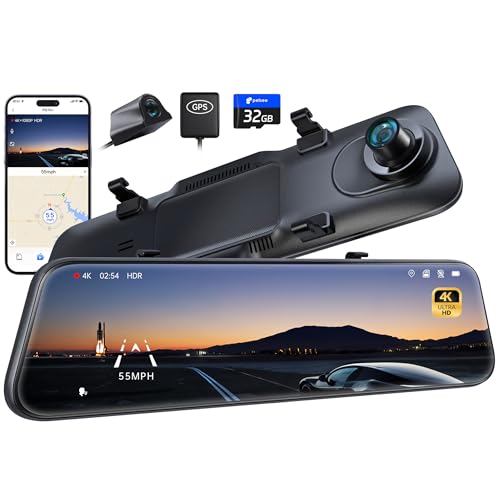
- Forward collision and blind-spot alerts
- 4K front and 1080P rear recording
- 5.8GHz Wi-Fi; up to 20MB/s downloads
Best For: Drivers wanting quick app transfers and multiple alerts
Best Speed Display Combo
ELING GPS HUD With Collision Alerts
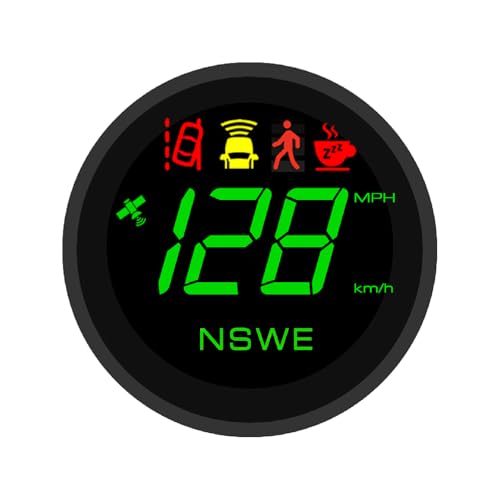
- GPS speed display with inertial module
- Front, pedestrian, and lane alerts
- 1080p recording with app playback
Best For: Drivers wanting speed data and driving alerts in one unit
Best Multi-Alert Dashcam

- 1440p front video; optional 1080p rear
- Collision, lane, blind-spot, and pedestrian alerts
- G-sensor incident saving and app access
Best For: Drivers who want video evidence and multiple driving alerts
Best for Voice Control – WOLFBOX G850 PRO Mirror Dash Cam
The WOLFBOX G850 PRO combines a forward collision warning system with a mirror dash cam, adding pedestrian, lane-departure, following-distance, and lead-vehicle-start alerts. It is a practical choice if you also want front and rear footage in one setup.
Best For: Drivers who want collision alerts, blind-spot warnings, and hands-free dash-cam controls.
Pros:
- ADAS alerts cover forward collisions and several other driving scenarios.
- Blind-spot detection adds lane-change and rear-collision alerts.
- Front and rear recording, 5.8GHz Wi-Fi, and 12 voice commands add everyday utility.
Cons:
- Mirror-mounted design may not suit drivers who want a standalone warning display.
- Installing the included rear camera requires routing its cable.
The included 64GB card and rear camera make this a well-equipped package. Choose it primarily for its combination of warning features and recording, rather than for a simple alert-only setup.
Dedicated Radar Pick – SAFE DRIVE SYSTEMS RD-140
The SAFE DRIVE SYSTEMS RD-140 is a dedicated forward collision warning system that pairs radar-based front-collision warnings with lane-departure warnings. Its listed specifications identify an LED display, but provide few further details about operation or installation.
Best For: Buyers seeking a radar-based warning unit rather than a mirror dash cam.
Pros:
- Provides radar-based front-collision warnings.
- Includes lane-departure warnings.
- Listed with an LED display.
Cons:
- Supplied product information does not specify vehicle compatibility or installation requirements.
- No recording or blind-spot features are listed.
This is the most focused warning device of the three. Confirm fitment and installation details before buying, since the supplied listing is brief.
Best for Fast Downloads – Pelsee P12 Pro Mirror Dash Cam
The Pelsee P12 Pro builds a forward collision warning system into a mirror dash cam with pedestrian, lane-departure, headway, and forward-movement alerts. It also offers front and rear recording for drivers who want footage alongside warnings.
Best For: Drivers who prioritize app-based video transfers and a broad set of driving alerts.
Pros:
- ADAS alerts and blind-spot detection cover multiple driving situations.
- Front 4K and rear 1080P cameras record both directions.
- 5.8GHz Wi-Fi supports stated download speeds up to 20MB/s; a 32GB card is included.
Cons:
- Parking monitoring requires a separately purchased hardwire kit.
- The included rear-camera cable may be too short for larger vehicles.
The P12 Pro is especially appealing if you expect to retrieve footage through its app. Check your mirror dimensions and rear-camera cable reach before committing to the installation.
Best Speed Display Combo – ELING GPS HUD With Collision Alerts
The ELING combines a GPS speedometer, a 1080p dashcam, and a forward collision warning system in one compact unit. It suits drivers who want speed information and several driving alerts together rather than a dashcam alone.
Best For: Drivers seeking a combined speed display, video recorder, and collision-warning device.
Pros:
- Displays GPS-based speed from 0 to 299 mph or km/h; the built-in inertial GPS module is designed to keep showing speed in tunnels and underground.
- Includes front-collision, pedestrian-collision, and lane-departure warnings.
- Records Full HD 1080p video with mobile-app playback.
Cons:
- The supplied specifications do not describe a rear camera.
- The 70 mm installation dimension is worth checking against your intended mounting location.
Choose this model for its mix of speed readout and ADAS alerts. If rear-view recording is a priority, the listed features do not establish that capability.
Best Multi-Alert Dashcam – TYPE S T200 PLUS 2K Dash Cam
The TYPE S T200 PLUS pairs a 1440p front camera with a forward collision warning system and several other driver alerts. An optional 1080p rear camera can add rear-facing footage for shoppers who want broader recording coverage.
Best For: Drivers prioritizing dashcam footage alongside collision, lane, and blind-spot warnings.
Pros:
- Provides front and rear collision warnings, blind-spot alerts, lane-departure warnings, and pedestrian detection.
- Records 1440p video up front, with an optional 1080p rear camera.
- Uses a G-sensor to protect incident footage from loop recording; the TYPE S Drive app provides wireless video access.
Cons:
- The rear camera is described as optional, so confirm what the listing includes.
- Park & Record’s 24-hour surveillance requires hardwiring.
This is the more recording-focused choice if you value multiple alerts and access to saved footage. Check the rear-camera configuration and hardwiring needs before buying.
How We Picked the Best Forward Collision Warning System
We compared the five selected products by their stated alert features, sensor approach, recording capabilities, display format, and installation needs. The lineup includes one dedicated radar-based warning system and four camera-based options with additional driving aids. Advertised features alone cannot establish how reliably a device detects hazards, so treat this as a feature comparison—not a verified ranking of real-world detection performance.
Quick Comparison
Start by deciding whether you want a standalone warning device or a dash cam that also records a drive. The RD-140 focuses on forward-collision radar and lane-departure warnings. WOLFBOX G850 PRO and Pelsee P12 Pro use mirror-style displays and list ADAS and blind-spot detection (BSD). The Type S T200 pairs front-and-rear recording with collision and lane warnings. The ELING option combines a GPS speed display, smart dash cam, and advertised collision and lane alerts. Check each product’s current listing for exactly which cameras, sensors, storage media, and mounting parts are included.
Key Buying Factors for a Forward Collision Warning System
Detection and Alert Behavior
Look for clear documentation of what triggers an alert: following distance, closing speed, a vehicle ahead, pedestrians, or lane markings. Radar- and camera-based designs can behave differently in rain, glare, darkness, or stop-and-go traffic. Seek an accessible way to adjust or mute alerts if available; frequent false alarms can make any warning system less useful.
Installation and Vehicle Fit
Confirm the mounting location, power connection, and whether the device needs calibration or precise positioning. A mirror replacement or overlay must fit your vehicle and leave a usable rear view; a dash-mounted display must not block your sightline. Check local rules on windshield-mounted devices and visible screens. If rear recording or blind-spot alerts matter, verify how the rear camera or relevant sensors are installed.
Recording and Everyday Usability
If you also want footage, compare front and rear video resolution, nighttime visibility, storage requirements, and how easily you can retrieve clips. Wi-Fi can simplify transfers, but it does not improve collision detection. Consider whether voice alerts, an on-screen display, or a head-up-style speed readout will be easiest to notice without taking your eyes off the road.
Most importantly, an aftermarket Forward Collision Warning System is an alert aid, not automatic emergency braking. It may miss hazards or warn too late, and it should never be used as a substitute for maintaining a safe following distance.
Who Should Buy Which Forward Collision Warning System?
Choose the RD-140 if your main goal is a dedicated radar-based warning setup and you are comfortable checking its installation requirements. Consider WOLFBOX G850 PRO or Pelsee P12 Pro if you want a mirror-style dash cam with advertised ADAS and BSD features. Pick Type S T200 if front-and-rear recording is central to your decision and you want lane and collision alerts alongside it. Consider ELING if an easily visible GPS speed display appeals to you as much as the advertised camera-based warnings. Whichever you choose, confirm compatibility and the exact alert functions before ordering.