OTTOCAST ScreenFlow 11.4 review is really a question of fit: do you want a self-contained in-car display that adds wireless phone integration, streaming apps, and backup-camera support without replacing the factory head unit?
If that is the goal, this is a seriously feature-dense option.
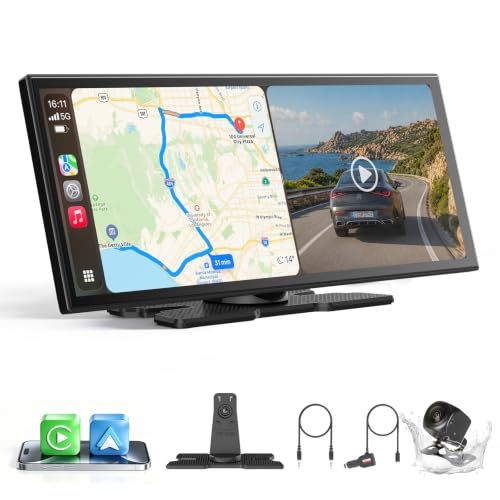
ScreenFlow 11.4 Review Summary
OTTOCAST ScreenFlow 11.4 is best for drivers who want a larger, more flexible infotainment-style screen and do not want to rely on a messy custom install.
The listing positions it as a universal car, SUV, truck, and RV upgrade, and that broad compatibility is the first thing that makes it interesting.
The strongest case for buying it is convenience.
You get wireless Apple CarPlay and Android Auto, a 11.4-inch 1920 x 720 IPS touchscreen, split-screen multitasking, dual-band WiFi, dual Bluetooth, pre-installed streaming apps, and a bundled 1080P backup camera.
That is a lot of functionality in one product, and it is especially appealing for commuters, families, and road-trippers who want one screen to do many jobs.
At the same time, this is not a minimalist product.
It is meant for buyers who actually want the extras.
If you only need basic phone mirroring, the ScreenFlow may be more device than you need.
But if you want a more modern cockpit feel, a cleaner wireless routine, and built-in video and camera features, it looks well-targeted.
Review Scorecard
| Category | Score | Why it scores this way |
|---|---|---|
| Wireless convenience | 9/10 | Wireless CarPlay and Android Auto reduce cable clutter and auto-reconnect after pairing. |
| Display usefulness | 8/10 | The 11.4-inch IPS panel and 1920 x 720 resolution should make maps and apps easy to read. |
| Feature depth | 9/10 | Split-screen, streaming apps, dual WiFi, dual Bluetooth, and a bundled camera add real versatility. |
| Installation simplicity | 8/10 | The listing emphasizes a tool-free, adhesive mount and no-drill setup. |
| Everyday driving fit | 8/10 | Works well for navigation, music, passenger entertainment, and parking support. |
| Value for feature seekers | 8/10 | Strong if you will use several functions, less compelling if you want only one or two basics. |
Bottom line: ScreenFlow 11.4 is a strong fit for buyers who want a broad set of in-car conveniences in one package, not just a wireless CarPlay bridge.
Key Features and Specifications of ScreenFlow 11.4
The core hardware is the 11.4-inch IPS touchscreen with a 1920 x 720 HD panel and a claimed 60fps refresh experience.
For in-car use, that matters because navigation, list scrolling, and split-screen layouts are easier to read on a larger display than on a small phone mount.
The listing also highlights wireless Apple CarPlay and Android Auto with one-time pairing and automatic reconnect on startup.
That is a practical detail, because the best wireless systems disappear into the background after setup.
You do not want to renegotiate connections every time you get in the car.
Another major selling point is the software stack.
The product comes with pre-installed Netflix, YouTube, Disney+, and Prime Video, with access tied to hotspot connectivity and the device’s curated Android OS.
That makes it more than just a projection screen.
It is also trying to be a compact media hub for parked viewing and passenger entertainment.
Useful listed specifications and features:
- 11.4-inch 1920 x 720 IPS touchscreen
- 60fps claimed smooth refresh
- Wireless Apple CarPlay and Android Auto
- Split-screen multitasking
- Pre-installed Netflix, YouTube, Disney+, and Prime Video
- Dual-band WiFi, 2.4G and 5G
- Dual Bluetooth, BT4.2 and BT5.0
- Included 1080P night-vision backup camera
- 19.69 ft cable for the rear camera
- 2-second instant wake claim
- Tool-free 3-minute installation claim
- 3M adhesive bracket mount
- OTA firmware updates
- 1-year warranty and 24-hour support claim
The camera bundle deserves separate attention.
The listing says the included rear camera is IP67 waterproof, has 1080P output, offers dynamic parking guidelines, and supports horizontal or vertical flip orientation.
That combination matters because backup-camera kits are often where universal accessories become annoying; the more mounting flexibility they provide, the easier they are to adapt to different vehicles.
Pros and Cons of ScreenFlow 11.4
Pros
- Wide feature set: It combines wireless smartphone projection, streaming, split-screen, and backup-camera support.
- Large readable display: The 11.4-inch format is easier to use than a phone screen or many smaller portable units.
- Simple setup direction: The listing emphasizes no-drill installation and a quick start-up routine.
- Family and passenger friendly: Streaming apps and split-screen mode make it more versatile for shared travel.
- Universal positioning: The product is marketed for cars, SUVs, pickups, trucks, and RVs.
Cons
- Feature overlap may be unnecessary: Buyers who only want navigation and music may not need the extra media functions.
- Curated Android OS limits freedom: The listing notes that additional apps are only available through the built-in app store.
- More parts, more setup: A screen plus camera plus mounting hardware means more to install and route than a basic wireless adapter.
- Dependence on hotspot or data: The streaming features are only useful when connectivity is available.
The best way to think about the pros and cons is this: the product is attractive when you value convenience and capability together.
It becomes less compelling if you want a stripped-down, phone-only solution.
Who Should Buy ScreenFlow 11.4?
Buy ScreenFlow 11.4 if you want a single in-car screen that can cover daily navigation, wireless phone integration, passenger entertainment, and parking assistance.
That mix is especially attractive for parents, rideshare drivers, long-distance commuters, and road-trippers who spend time in the vehicle and will actually use the larger display.
It also makes sense if your current dash setup feels dated and you want a cleaner, more modern interface without replacing the entire factory head unit.
The universal positioning and adhesive mount suggest it is designed for buyers who want an upgrade path with less commitment than a full infotainment retrofit.
You should probably skip it if you are happy with wired CarPlay or Android Auto already, or if you do not care about streaming apps in the car.
The more you strip this product down to only one function, the less special it becomes.
It is also not the right pick if you dislike curated software environments.
The listing makes clear that app availability is tied to the device’s built-in Android ecosystem, so buyers who want unrestricted app flexibility should be cautious.
Driving Experience and Setup Fit
Daily Navigation and Phone Integration
For most buyers, the real value starts with the wireless CarPlay and Android Auto setup.
Once paired, the screen is supposed to reconnect automatically, which is exactly what you want from a daily driver accessory.
That should make trip starts faster and reduce the friction of cable management.
Split-Screen and Passenger Use
Split-screen mode is one of the more practical extras because it lets navigation stay visible while another app is active.
That is useful for long trips, but it is also a good example of why this product exists: it is not just trying to mirror your phone, it is trying to make the cabin feel more capable.
Backup Camera and Parking Confidence
The included 1080P camera changes the product from an entertainment display into a more complete driving aid.
The parking guidelines, weather-resistant build, and orientation options should make it easier to adapt to different mounting positions and vehicle types.
Installation and Long-Term Convenience
The 3M adhesive bracket and no-drill positioning are important because they lower the barrier to ownership.
The product still needs routing, power, and camera placement, but the listing is clearly aiming for a faster install than a traditional audio upgrade.
OTA updates and support are a bonus if you plan to keep the device for a while.
Alternatives to ScreenFlow 11.4
If you want a more established portable car display approach, consider Podofo wireless CarPlay screen, which is often used for straightforward add-on infotainment setups.
If your priority is a familiar brand with broad aftermarket recognition, look at Carpuride wireless CarPlay display.
It is a credible comparison point for buyers evaluating portable dash screens.
If you want to stay closer to a head-unit-style upgrade path, BOSS Audio wireless Apple CarPlay receiver may make more sense, especially if you do not need the streaming-app emphasis.
If you mainly want a simpler screen for phone projection and do not care about the bundled camera or app ecosystem, browsing wireless Android Auto portable screen can help you compare thinner-featured options.
Is ScreenFlow 11.4 Worth It?
Yes, if you want a feature-rich universal car screen and will use more than just wireless phone projection.
The OTTOCAST ScreenFlow 11.4 is most compelling for buyers who want a larger display, streaming capability, split-screen convenience, and a backup-camera bundle in one package.
If you only need basic CarPlay or Android Auto, it is probably more product than you need.
But if your buying goal is to make the car feel more modern and more versatile without a full head-unit replacement, this looks like a worthwhile option.