A head-up display can keep essential information in your line of sight, helping you check speed, navigation prompts, and alerts without repeatedly looking down at the dashboard. The right model depends on your car, phone setup, preferred display size, and tolerance for installation.
We’ve gathered 10 options covering plug-and-play GPS units, OBD2 displays, wireless CarPlay and Android Auto models, and compact designs for everyday commuting. Use the guide below to compare features and choose a HUD that fits your driving routine.
Best 10 Car Head Up Displays for Daily Driving Picks for 2026
Best GPS Safety Monitor

- GPS and Beidou positioning for broad compatibility
- Speed, direction, mileage, and time readouts
- Overspeed and fatigue-driving alarms
Best For: Drivers wanting a compact GPS display with safety reminders
Best Connected HUD

- Wireless CarPlay and Android Auto support
- GPS data with overspeed warnings
- OBD and cigarette-lighter power options
Best For: Drivers wanting phone integration and broad compatibility
Best Solar-Powered Option

- Solar and USB charging with built-in battery
- Large-font LCD for speed and trip data
- Overspeed and fatigue-driving reminders
Best For: Drivers seeking cordless-style GPS information
Best Smart Commuter Display

- Wireless CarPlay and Android Auto
- Color anti-glare display with adaptive brightness
- Voice control, calls, navigation, and media
Best For: Connected commuting and road-trip convenience
Best All-Around Display

- Dual GPS and Beidou positioning
- 5.5-inch screen with 10+ layouts
- USB setup and rotating bracket
Best For: Drivers wanting detailed trip and navigation information
Best Connected Option
- CarPlay and Android Auto support
- OBD and cigarette-lighter power options
- Broad vehicle compatibility with heat protection
Best For: Drivers wanting phone connectivity and versatile installation
Best GPS Pick

- GPS and BDS positioning with a 10Hz refresh rate
- Auto brightness and large anti-reflective display
- USB-powered; no OBD port required
Best For: Drivers wanting a simple GPS speed display with broad USB compatibility
Best OBD Value
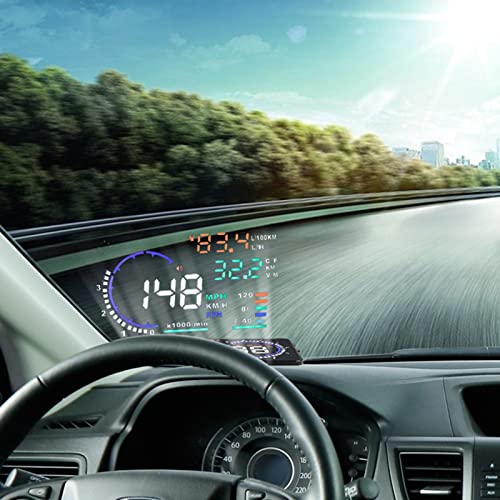
- Shows speed plus RPM, temperature, voltage, and fuel data
- Includes overspeed and vehicle-condition reminders
- Auto power on/off with compatible OBD vehicles
Best For: Drivers seeking broad vehicle information from an OBD-connected HUD
Best Large Screen

- Large 5.5-inch HD screen with auto brightness
- Combines GPS speed with vehicle monitoring data
- Offers alerts and OBD2 diagnostic functions
Best For: Compatible-vehicle owners wanting a large, multifunction HUD
Best GPS Safety Monitor – Compact Dual-System HUD
For drivers comparing car head up displays for daily driving, this compact GPS unit focuses on essential information without relying on vehicle-specific OBD compatibility. It shows speed, time, direction, mileage, satellite count, and driving time, while its 10-frames-per-second refresh rate keeps speed changes smooth.
Best For: Drivers who want a straightforward, compact GPS speed display with configurable safety reminders.
Pros:
- GPS and Beidou dual-mode positioning is designed for broad vehicle compatibility.
- Displays speed, clock, direction, mileage, driving time, and satellite count.
- Includes adjustable overspeed and fatigue-driving alarms.
- Automatic brightness adjustment helps reduce glare in changing conditions.
Cons:
- Its feature set is centered on driving data rather than smartphone connectivity.
- Alarm settings and speed compensation may require initial setup.
This is a practical choice if you prefer a small, dedicated display for speed and trip information. It is less suitable if you want wireless CarPlay, Android Auto, or media functions.
Best Connected HUD – HUD-3 Car Head-Up Display
This HUD-3 is a versatile option among car head up displays for daily driving, combining GPS driving data with wireless phone features. It projects speed, travel time, distance, mileage, and overspeed alerts on an anti-glare lens, while supporting wireless CarPlay and Android Auto.
Best For: Drivers seeking a connected dashboard display with broad vehicle compatibility and phone integration.
Pros:
- GPS operation works with sedans, trucks, SUVs, RVs, pickups, older vehicles, modified vehicles, and some cars without OBD support.
- Supports wireless CarPlay, Android Auto, Bluetooth, and hands-free calling features.
- Offers both OBD and cigarette-lighter power options, with vibration-activated wake-up on the OBD connection.
- Automatic brightness adjustment and an anti-glare lens support daytime and nighttime readability.
Cons:
- Phone pairing involves both Bluetooth and Wi-Fi, so setup may take a few steps.
- The built-in cooling and temperature protection may shut the unit down if it exceeds 75°C.
Choose this model if navigation, calls, and media matter as much as basic speed information. Its dual power options and GPS-based compatibility make it flexible, but the connected features require more setup than a simple speedometer.
Best Solar-Powered Option – Wireless GPS HUD
For daily commuters looking at car head up displays for daily driving, this wireless GPS model stands out for its built-in battery and solar charging panel. Its LCD screen shows speed, total mileage, time, altitude, and satellite information, while vibration activation helps conserve power when parked.
Best For: Drivers who want a cordless-style GPS display with solar assistance and configurable alarms.
Pros:
- Supports solar and USB power with a built-in 1000mAh lithium battery.
- Large-font LCD readouts are designed for quick viewing in day or night conditions.
- Offers two overspeed alarm modes, city and high-speed settings, plus a fatigue-driving reminder.
- Automatically wakes with vehicle vibration and shuts off after parking to save energy.
Cons:
- It provides GPS driving information but does not list CarPlay, Android Auto, or calling features.
- Solar charging performance depends on available light, so USB power remains useful.
This model makes sense when minimizing cable clutter is a priority. Its battery, solar panel, and automatic power behavior are useful for routine driving, while its feature set remains focused on vehicle information and alerts.
Best Smart Commuter Display – 2.99-Inch CarPlay HUD
This 2.99-inch color unit is aimed at drivers who want more than a speed readout from car head up displays for daily driving. It combines wireless CarPlay and Android Auto with GPS guidance, Bluetooth calls, media streaming, voice controls, and optional OBD/GPS vehicle data on a high-luminance anti-glare screen.
Best For: Commuters and road-trip drivers who want navigation, calls, media, and vehicle information in one dashboard-mounted display.
Pros:
- Supports wireless CarPlay, Android Auto, Bluetooth calling, GPS guidance, and media streaming.
- 800×268 color display includes adaptive brightness and an anti-glare screen for sunlight visibility.
- Voice commands can control navigation, calls, music, and weather-related functions.
- Silicone base is designed to resist shifting on turns, braking, and rough roads.
Cons:
- OBD vehicle data is optional, so available information may depend on the chosen connection.
- Its connected features depend on a compatible smartphone.
- At 2.99 inches, the display is compact rather than tablet-sized.
This is the strongest fit for buyers prioritizing smartphone connectivity and hands-free convenience. It costs more complexity than a basic GPS HUD, but its color display and voice-enabled features suit frequent commuting and longer trips.
Best All-Around Display – HUD G12 GPS Speedometer
For drivers comparing car head up displays for daily driving, the HUD G12 offers a broad set of trip and navigation readouts without complicated installation. Its GPS and Beidou dual-mode positioning, large 5.5-inch screen, and USB plug-and-play setup make it a practical choice for everyday use.
Best For: Drivers who want speed, trip, direction, and driving-time information in one adjustable display.
Pros:
- Displays speed, time, trip mileage, driving direction, coordinates, and other data.
- Offers more than ten display combinations for personal customization.
- Includes a 360-degree rotating bracket for flexible placement.
- Installs through USB power and includes a one-year warranty.
Cons:
- The feature-rich interface may be more information than some drivers need.
- Its plastic construction may feel less premium than higher-end alternatives.
The G12 is a versatile daily-driving HUD for shoppers who value configurable information and easy placement. It is especially appealing if trip metrics and directional data matter as much as displaying speed.
Best Simple Speed Readout – K4 Windshield HUD
If your priority is a clear speed display, this K4 is a straightforward option among car head up displays for daily driving. It uses GPS and BDS positioning, supports MPH or KM/H, and adds brightness adjustment and speed calibration for more comfortable everyday viewing.
Best For: Drivers seeking a compact, readable speedometer with basic safety alerts and simple USB power.
Pros:
- Uses dual-mode GPS and BDS with a 10Hz refresh rate.
- Switches between MPH and KM/H and supports manual speed calibration.
- Offers adjustable brightness for daytime and nighttime driving.
- Includes a customizable overspeed alert and large-font display.
Cons:
- GPS performance can be affected in tunnels, garages, severe weather, or behind metallic windshield film.
- The listed functions focus primarily on speed rather than broader trip information.
The K4 keeps the experience focused: plug it into USB power, choose your units, and set the display to your preference. It suits drivers who want an uncomplicated speed readout rather than a multifunction dashboard.
Best Connected Option – HUD-V3 CarPlay Display
For drivers who want more than speed, the HUD-V3 combines a GPS speedometer with CarPlay and Android Auto support. As one of the more versatile car head up displays for daily driving, it offers two power options, broad vehicle compatibility, and a design intended to remain usable in direct sunlight.
Best For: Drivers who want smartphone connectivity, overspeed alerts, and flexible installation across different vehicle types.
Pros:
- Supports CarPlay and Android Auto alongside GPS speed display.
- Includes both an OBD cable and cigarette-lighter power cable.
- Works with sedans, trucks, SUVs, RVs, pickup trucks, modified vehicles, and many non-OBD cars.
- Has automatic shutoff, vibration wake-up, overheat protection, and a stated -20°C to 75°C operating range.
Cons:
- Phone connectivity requires Bluetooth and Wi-Fi to remain enabled.
- The integrated cooling fan and broader feature set may add complexity compared with a basic speed HUD.
- Its listed warranty terms require shipping costs after the first month.
The HUD-V3 is the strongest fit for shoppers seeking a connected, multi-vehicle display rather than a dedicated speedometer alone. Its dual power options and phone integration add flexibility, while the heat-management features support dashboard installation.
Best GPS Pick – USB Car HUD Speedometer
For drivers comparing car head up displays for daily driving, this compact GPS unit offers a straightforward way to view speed without looking down. Its USB power, automatic brightness adjustment, and large display make it practical for many vehicles.
Best For: Drivers who want a simple, USB-powered GPS speed display without using the vehicle’s OBD port.
Pros:
- Uses dual-mode GPS and BDS positioning with a 10Hz refresh rate.
- Automatically adjusts brightness for daytime and nighttime visibility.
- Large, anti-reflective speed display is designed for easy reading.
- USB-powered and compatible with most cars, trucks, and motorcycles with a USB port.
Cons:
- GPS accuracy can vary slightly, with a stated deviation of 0.6–1.8 MPH.
- Signal may be affected in tunnels, garages, heavy weather, or behind metallic windshield film.
- Displays speed-focused information rather than broader vehicle diagnostics.
This is a sensible daily-driving option when you value easy installation and clear speed projection. It is especially appealing for vehicles without a convenient OBD-II connection, though GPS limitations should be considered.
Best OBD Value – Multi-Color Vehicle Data HUD
Among car head up displays for daily driving, this OBDII/EUOBD model stands out for showing more than speed. It can project vehicle data such as RPM, temperature, voltage, and fuel information, while also providing configurable alarms.
Best For: OBD II- or EUOBD-compatible vehicles whose drivers want expanded dashboard data and warning reminders.
Pros:
- Displays speed, engine RPM, water temperature, battery voltage, fuel consumption, and mileage.
- Offers overspeed, high-temperature, low-voltage, fatigue-driving, and shift reminders.
- Uses a high-definition display with manual brightness adjustment and reflection-reducing technology.
- Automatically powers on and off with the vehicle.
Cons:
- Requires a compatible OBD II or EUOBD vehicle.
- Its richer data set may be more than some drivers need for everyday speed monitoring.
- The supplied notes do not specify compatibility by model year or vehicle make.
This HUD is a good fit if you want a more informative display than a basic speedometer. Confirm your vehicle’s OBD compatibility before buying, especially if you mainly want a simple plug-in setup.
Best Large Screen – OBD2 GPS Car HUD
For car head up displays for daily driving, this model combines a large 5.5-inch screen with GPS speed and OBD2 vehicle information. It is designed for drivers who want a prominent projection plus access to temperature, voltage, fuel, and diagnostic data.
Best For: OBD2/EOBD vehicle owners who want a large display and multifunction monitoring in one unit.
Pros:
- 5.5-inch HD screen with automatic brightness adjustment.
- Displays GPS speed in MPH or KMH along with RPM, water temperature, voltage, and fuel consumption.
- Provides speeding and voltage alerts plus failure detection and code-related functions.
- Plug-and-play setup through the vehicle’s OBD2 port.
Cons:
- Requires a vehicle using OBD2 or EOBD protocols.
- Larger dimensions may be less discreet than compact HUD units.
- The supplied notes do not detail how all diagnostic functions work across different vehicles.
This is the most feature-rich choice of the three for drivers who want a large, information-heavy display. Its appeal depends on having a compatible OBD2 vehicle and being comfortable with more dashboard data.
How We Picked the Best Car Head Up Displays for Daily Driving
We focused on features that matter during regular commuting and errands: readable speed information, dependable power options, windshield visibility, installation effort, and compatibility with different vehicles. The selection includes GPS-based units that work across many cars, OBD2/EUOBD models that can access vehicle data, and displays with wireless CarPlay or Android Auto support.
We also considered practical extras such as overspeed warnings, MPH/KMH selection, mileage and trip information, screen size, brightness controls, and multi-color displays. Because product specifications can vary by seller and vehicle, confirm the listing’s compatibility and included accessories before ordering.
Quick Comparison
| Display type | Best for | Main consideration |
|---|---|---|
| GPS HUD | Broad vehicle compatibility | May need a clear view of the sky for accurate positioning |
| OBD2/EUOBD HUD | Vehicle data and simple speed monitoring | Requires a compatible diagnostic port |
| CarPlay/Android Auto HUD | Phone-connected navigation and media | More setup and smartphone dependence |
| Large-screen projector | At-a-glance readability | Can occupy more windshield or dashboard space |
Key Buying Factors for Car Head-Up Displays for Daily Driving
Compatibility and Installation
GPS models usually connect through USB or a vehicle power socket and are often the easiest choice for mixed or older vehicles. OBD2 units plug into the car’s diagnostic port, but port location and protocol support differ. If you want wireless CarPlay or Android Auto, verify phone compatibility and whether the device supports the features you use most.
Display Clarity and Placement
Choose a screen large enough to read quickly without blocking your view. A bright, adjustable display is helpful in daylight, while dimming controls reduce distraction at night. Windshield projection can be easy to see, but the supplied reflective film or mounting position may affect clarity.
Information and Alerts
Decide whether you need only speed or also navigation direction, altitude, mileage, trip time, vehicle data, and overspeed alarms. More information is not always better for daily driving; prioritize a clean layout that can be understood in a brief glance.
Power and Reliability
USB-powered models are convenient when a charging port is nearby. Solar-assisted units may reduce cable clutter, but performance depends on light and battery capacity. Look for stable mounting, responsive controls, and clear instructions.
Who Should Buy Which Car Head Up Displays for Daily Driving?
- Choose a GPS speedometer HUD if you want a broadly compatible, plug-and-play speed display without relying on the vehicle’s diagnostic system.
- Choose an OBD2 HUD if your car is compatible and you want direct vehicle data with a straightforward installation.
- Choose a CarPlay or Android Auto model if navigation, calls, and smartphone integration are more important than a simple speed readout.
- Choose a large 5.5-inch display if readability is your priority, especially when smaller digits are difficult to see.
- Choose a compact HUD if you have limited dashboard space or want the least obtrusive setup for routine commuting.
For most drivers, the best Car Head Up Displays for Daily Driving are the ones that show only the information needed, remain readable in changing light, and install securely without creating new distractions.