Innova SD35 OBD2 scanner review searches usually come from drivers who are past basic code reading and want a more capable tool.
This Innova SD35 review focuses on what the listing actually supports: all-system diagnostics, live data, and practical service functions.
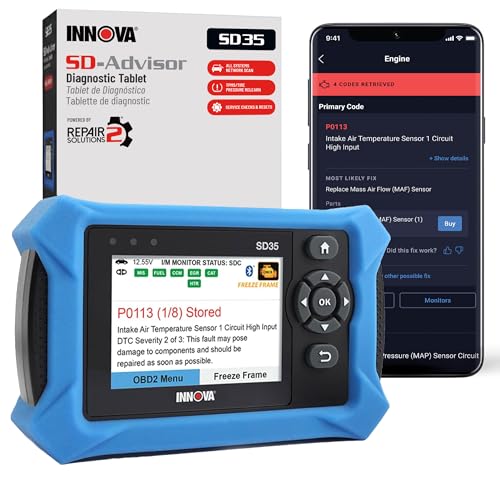
SD35 Review Summary
The Innova SD35 is a strong fit for DIY owners who want a tablet-style diagnostic tool that goes beyond the check engine light.
It is especially appealing if you want one device for engine codes, ABS, SRS, TPMS checks, live data, and common maintenance resets without a subscription model getting in the way.
What makes it compelling is not a single headline feature, but the combination of breadth and approachability.
The listing positions it as an advanced scanner with a high-resolution display, RepairSolutions2 app support, verified fixes, and coverage for many 1996-and-newer vehicles, while also warning that feature support can vary by vehicle.
That is the right kind of honesty for a tool like this: useful, but not universal.
It is best for home mechanics, budget-conscious DIYers, and owners who want a meaningful upgrade from a basic OBD2 code reader.
It is less compelling if you only want the cheapest possible device for clearing an occasional engine light, or if you need guaranteed coverage for a very specific vehicle system without checking compatibility first.
Review Scorecard
| Category | Score | Why it scores here |
|---|---|---|
| Diagnostic breadth | 9/10 | Listing says it covers engine, transmission, ABS, SRS, TPMS, and more. |
| Ease of use | 8/10 | Tablet format and high-resolution display should be easier to work with than tiny-screen readers. |
| Maintenance utility | 8/10 | Oil reset, TPMS checks, and service functions make it more than a code reader. |
| Value for DIY owners | 8/10 | Broad capability and no subscription pitch make it attractive for repeated home use. |
| Vehicle coverage clarity | 7/10 | Coverage is broad, but the listing repeatedly says to verify compatibility because support varies. |
| App ecosystem | 8/10 | RepairSolutions2 adds verified fixes, step-by-step guidance, and parts suggestions. |
Key Features and Specifications of SD35
The SD35 is an Innova tablet-based OBD2 scanner built around broad diagnostics rather than narrow fault-code reading.
The listing says it can read and clear check engine codes and also handle ABS, SRS, and TPMS functions, which immediately places it above the most basic parts-store style readers.
It also supports live data, including RPM, fuel trims, temperature readings, and oxygen sensor performance.
That matters because live data is what helps you move from “what code is stored?” to “what is the car doing right now?” For many repairs, that is the difference between swapping parts blindly and narrowing the issue methodically.
The product page also calls out:
- All-system diagnostics across engine, transmission, ABS, SRS, and more
- Battery and alternator testing
- TPMS sensor checks
- Oil light reset and other service resets
- A high-resolution tablet display
- Compatibility with many 1996-and-newer cars and trucks
- RepairSolutions2 app support with verified fixes, repair guidance, and cost estimates
- No subscription requirement according to the listing
- A 1-year limited warranty
One important limitation is built into the listing itself: feature coverage may vary by vehicle.
That is not a flaw unique to Innova, but it is a real buying constraint.
An advanced scanner is only valuable when it supports the systems you actually need on your vehicle.
Pros and Cons of SD35
Pros
- Broad system coverage for a consumer tool
- Live data makes diagnosis more actionable
- Service functions add everyday value
- Tablet-style interface should be easier to read than compact scanners
- RepairSolutions2 support improves the “what now?” stage after finding a code
- No-subscription positioning is appealing for long-term ownership
Cons
- Compatibility is not uniform across all vehicles and systems
- Buyers still need to check coverage before assuming a feature will work
- It may be more tool than a casual driver needs
- The listing does not promise every function on every supported car
Who Should Buy SD35?
The Innova SD35 makes the most sense for people who keep a vehicle for years and want to handle some diagnostics themselves.
If you routinely check warning lights, compare live data, or want a scanner that can help with more than engine faults, this is the kind of product that can earn its place in the garage.
It is also a sensible fit for buyers who value guided repair support.
The listing’s reference to verified fixes, repair steps, and suggested parts suggests a workflow that helps users move from diagnosis to action.
That is useful for people who do not want to cross-reference everything manually.
You should also consider it if you work on more than one vehicle and want a scanner with broader system coverage.
The product is described as compatible with many 1996-and-newer cars and trucks, including common brands like Toyota, Ford, Honda, Chevrolet, Nissan, and Dodge.
That kind of breadth is a selling point, though it still does not replace a compatibility check.
Who should skip it?
Drivers who only want to erase a rare check engine light and never look deeper.
If that is your use case, a simpler reader may be enough.
Also skip it if you need a guaranteed, fully verified match for a single vehicle and do not want to spend time checking feature coverage first.
Diagnostic Depth of SD35
All-System Scanning
The biggest advantage here is range.
The SD35 is not framed as just an engine-code reader; it is marketed for engine, transmission, ABS, SRS, TPMS, and additional system coverage.
For DIY owners, that broader access is useful because many of the most frustrating dashboard lights are not engine-related.
Live Data and Troubleshooting
Live data support matters because it helps you see how the car is behaving instead of relying only on stored codes.
RPM, fuel trims, temperature readings, and oxygen sensor performance are the kinds of values that make diagnosis more structured.
That is especially helpful when a fault is intermittent or when a code points to several possible causes.
Service Functions
The SD35 also includes practical maintenance features such as oil reset, TPMS sensor checks, battery and alternator testing, and other service resets.
These are not glamorous features, but they are the ones that can make a scanner stay useful after the initial repair job is done.
App-Guided Repairs
RepairSolutions2 is one of the cleaner parts of the listing because it adds repair guidance instead of stopping at raw diagnostic output.
Verified fixes, step-by-step direction, and parts suggestions can save time for owners who do not want to interpret every code from scratch.
It is still a guide, not a substitute for judgment, but it raises the tool’s practical value.
Alternatives to SD35
If the SD35 feels broader than you need, there are several credible Amazon-friendly alternatives to compare:
- Innova 5210
- BlueDriver Bluetooth Pro OBD2 Scanner
- Autel MaxiCOM scanners
- FOXWELL NT-series scanners
- ANCEL OBD2 scanners
The right comparison depends on what you value most.
BlueDriver is often attractive for app-centric users.
Autel and FOXWELL are worth checking if you want a different balance of diagnostics and service features.
The Innova 5210 is a simpler place to start if you only need core code-reading features.
Is SD35 Worth It?
For the right buyer, yes, the Innova SD35 looks worth it.
Its value comes from combining broad diagnostic coverage, live data, service functions, and app-based repair guidance in a single tool.
The important caveat is that this is an advanced scanner, not a universal magic wand.
You should still verify vehicle coverage before buying, especially if you are after a specific system like TPMS or SRS.
If you want a more capable DIY diagnostic tool and will actually use the extra depth, the SD35 is a sensible buy.
If you only need a basic code reader, it is probably more scanner than you need.