Choosing the right OBD2 scanner for Ford Maverick can save time, money, and frustration when a warning light appears or a module needs deeper diagnosis.
Whether you want a simple check-engine reader, a FORScan-compatible tool, or a more advanced all-system scanner, this roundup focuses on practical options for Maverick owners.
Best 10 OBD2 Scanner for Ford Maverick Picks for 2026
Ford-Specific Full-System Scanner
ANCEL FD500 for Ford Lincoln Mercury

- Reads engine, ABS, SRS, transmission, HVAC, and 4WD codes
- Adds EPB, throttle/KAM, oil reset, and battery registration
- Lifetime free updates and one-year warranty
Best For: Ford owners who want a dedicated all-systems scanner with maintenance resets
Wireless App-Based Adapter

- Works with iPhone, Android, and Windows devices
- Recommended for FORScan and other apps
- Has over-voltage and battery drain protection
Best For: Drivers who want wireless Ford diagnostics through a phone or PC app
No-Subscription Bluetooth Scanner
BlueDriver Pro Next-Gen OBD2 Scanner

- Works with iPhone and Android over Bluetooth
- Includes repair reports, live data, and smog-readiness tools
- No subscription fees and free app updates
Best For: Drivers who want a simple wireless scanner with repair reports and no monthly fees
2-in-1 Check Engine + Battery Test

- Combines OBD2 code reading with 12V battery testing
- Includes live data, EVAP testing, and I/M readiness
- No app or subscription needed
Best For: Drivers who want a simple standalone scanner for engine codes and battery checks
Premium All-System Diagnostic Pick
FOXWELL NT624 Elite for Ford Maverick Owners
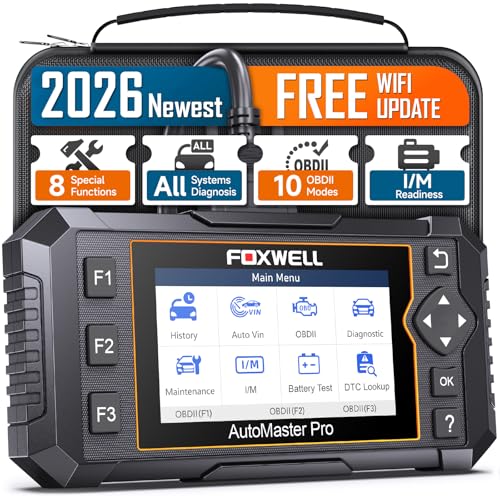
- Reads all-system codes across major vehicle domains
- Includes 8 service functions like oil reset and SAS calibration
- AutoVIN, live data, and lifetime Wi-Fi updates
Best For: Drivers who want advanced diagnostics and maintenance coverage
Budget-Friendly Check Engine Reader

- Reads and clears engine-related codes
- Shows live data, freeze frame, and readiness status
- No app, Bluetooth, or charger needed
Best For: Simple check-engine diagnostics and emissions readiness
Compact Basic Code Reader
MOTOPOWER MP69033 for Ford Maverick

- Reads, clears, and looks up basic engine codes
- Includes live data, freeze frame, and I/M readiness
- Compact handheld design with vehicle power
Best For: Glovebox-friendly basic engine diagnostics
Ford-Specific Full-System Scanner – ANCEL FD500 for Ford Lincoln Mercury
If you want an OBD2 scanner for Ford Maverick use that goes beyond basic code reading, the ANCEL FD500 is built specifically for Ford, Lincoln, and Mercury vehicles. It reads and clears codes across major systems and adds a few useful service functions, making it a practical choice for home maintenance and deeper troubleshooting.
Best For: Ford owners who want a dedicated, all-systems scanner with a few maintenance resets.
Pros:
- Ford-specific coverage for engine, ABS, SRS, transmission, HVAC, and 4WD systems
- Includes useful service functions like EPB, throttle/KAM, oil reset, and battery registration
- Supports many Ford-group vehicles from 1996 onward, including F-Series and Maverick-era models
- Lifetime free updates and a one-year warranty add long-term value
Cons:
- Best compatibility is limited to Ford, Lincoln, and Mercury vehicles
- Special functions and coverage depend on vehicle support and latest update status
- Not a universal all-brand flagship tool for mixed-garage use
This is a strong pick if your priority is Ford-specific diagnostics rather than a generic scanner. It offers broad system access and maintenance features at a more focused, value-oriented price point.
Wireless App-Based Adapter – OBDLink MX+ Bluetooth Scanner
The OBDLink MX+ is a Bluetooth OBD2 scanner for Ford Maverick drivers who want app-based diagnostics on a phone, tablet, or Windows PC. It is recommended for FORScan and other popular apps, and its enhanced OEM support makes it a flexible option for reading more live parameters than basic code readers.
Best For: Drivers who want a wireless adapter for app-based Ford diagnostics on iPhone, Android, or Windows.
Pros:
- Works with iPhone, Android, and Windows devices
- Recommended for FORScan and other diagnostic apps
- Enhanced OEM support for Ford plus several other major brands
- Includes over-voltage and battery drain protection with firmware updates
Cons:
- Requires a compatible phone, tablet, or Windows PC to use
- Vehicle compatibility and feature support should be checked before buying
- Not a standalone handheld scanner
If you already prefer app-based diagnostics, this adapter is a clean way to turn your device into a capable scan tool. It fits well for owners who want flexibility, protection features, and broad software support.
FORScan USB Diagnostic Cable – OHP FORScan USB Scanner for Ford Vehicles
If you want a more hands-on OBD2 scanner for Ford Maverick diagnostics on a Windows computer, this OHP USB tool is built around FORScan support and Ford-family compatibility. It is aimed at DIY troubleshooting, code reading, and clearing, with an MS-Can/HS-Can switch for Ford, Lincoln, Mazda, and Mercury vehicles.
Best For: DIY owners using a Windows laptop and FORScan for Ford-family diagnostics.
Pros:
- Designed for Ford, Lincoln, Mazda, and Mercury vehicles
- Supports FORScan and includes MS-Can/HS-Can switching
- Reads, interprets, and clears DTCs across systems like engine, transmission, and ABS
- USB connection can reach up to 500 kbit/s and has a two-year warranty
Cons:
- Windows only; not compatible with Mac, Chromebook, tablets, or mobile devices
- FORScan software is downloaded separately and some features may need an Extended License
- Not meant for emissions-system modification
This is a solid pick if you specifically want FORScan functionality rather than a standalone screen-based scanner. The tradeoff is that it needs a Windows setup, but it offers a focused diagnostic workflow for Ford-family vehicles.
No-Subscription Bluetooth Scanner – BlueDriver Pro Next-Gen OBD2 Scanner
For a Ford Maverick owner who wants a simple wireless OBD2 scanner, BlueDriver Pro Next-Gen focuses on app-based diagnostics without subscription fees. It reads and clears standard and enhanced codes on supported vehicles, and it adds repair reports, live data, and smog-readiness tools for more practical everyday use.
Best For: Drivers who want a no-subscription Bluetooth scanner with strong app support and repair reports.
Pros:
- Works with iPhone and Android through a wireless Bluetooth connection
- Supports enhanced diagnostics like ABS, SRS, TPMS, and transmission on supported vehicles
- Includes technician-verified repair reports matched to your VIN
- No subscription fees and free app updates included
Cons:
- Advanced coverage depends on vehicle support and compatibility charts
- Requires a phone or tablet to operate
- Not a dedicated Ford-only tool
This is a good all-around option if you want phone-based diagnostics and repair guidance instead of a traditional handheld scanner. Its no-subscription model and broad make coverage make it especially appealing for daily use.
Ford Coding & Hidden Features – ELM327 USB Ford Scanner
If you want an OBD2 scanner for Ford Maverick that focuses on Ford-specific coding and module access, this ELM327 USB adapter is built for that kind of work. It uses MS-CAN and HS-CAN toggle switches, a wired USB connection, and Windows-based software support for diagnostics, fault-code reading, and configuration changes.
Best For: Ford owners who want a USB tool for hidden features, module setup, and more advanced Ford/Lincoln/Mazda/Mercury diagnostics.
Pros:
- MS-CAN/HS-CAN toggle switches for Ford-specific troubleshooting and configuration
- USB connection with V1.5 hardware for stable, professional-style diagnostics
- Supports Ford hidden features like global windows, Bambi mode, tire size calibration, and more
- Works with Windows software such as Elmconfig, FoCCCus, and FF2
Cons:
- Requires driver installation and software setup before use
- Not plug-and-play, so it may be less convenient than wireless scanners
- Windows-only, so it is not suited to mobile app users
This is a good pick if your priority is Ford-focused customization rather than simple code reading. The wired layout and CAN switching make it more specialized than a basic OBD2 reader.
Wireless All-System Scan – KINGBOLEN Ediag Link Bluetooth
If you want an OBD2 scanner for Ford Maverick with broader all-system coverage, this KINGBOLEN unit is aimed at deeper diagnostics and everyday service work. It pairs by Bluetooth, works with iOS and Android, and adds bidirectional control, live data, and a long list of maintenance resets for supported vehicles.
Best For: DIY owners who want a wireless all-system scanner with active tests and service resets.
Pros:
- Bluetooth 5.2 wireless connection with iOS and Android support
- All-system diagnostics with Auto VIN, live data, freeze frame, and code clearing
- Bidirectional control and active tests for components like fans, windows, doors, and A/C clutch
- Includes 10+ maintenance functions such as oil reset, brake reset, DPF regen, and TPMS reset
Cons:
- Special functions vary by vehicle, so not every reset will work on every model
- FCA AutoAuth needs a separate paid account
- Uses a subscription model after the first year for continued full access
For shoppers who want more than basic code reading, this scanner offers a strong mix of wireless convenience and advanced features. It makes the most sense if you want one tool for diagnostics, testing, and routine maintenance.
2-in-1 Check Engine + Battery Test – FOXWELL NT301 Plus
If you want an OBD2 scanner for Ford Maverick that does more than read engine codes, the FOXWELL NT301 Plus combines a check-engine reader with a 12V battery tester. It is designed for quick pre-drive checks, live data viewing, and basic troubleshooting on 1996+ OBDII vehicles without requiring an app.
Best For: Drivers who want a simple handheld scanner for code checks plus battery, starting, and charging system testing.
Pros:
- 2-in-1 tool combines OBD2 code reading with 12V battery testing
- Supports battery health, starting power, and charging system checks
- Includes live data, I/M readiness, EVAP testing, and DTC lookup
- No app or subscription required, with a built-in color display
Cons:
- Limited to standard OBD2 functions rather than advanced coding or bidirectional control
- Requires a firm battery cable connection to run battery tests
- Compatibility exclusions apply for some makes and older vehicles
This is a practical pick if you want a straightforward handheld scanner for everyday diagnosis and battery checks. It is especially useful if you prefer a self-contained tool with no phone pairing or software setup.
Premium All-System Diagnostic Pick – FOXWELL NT624 Elite for Ford Maverick Owners
If you want an OBD2 scanner for Ford Maverick that goes well beyond a simple check-engine reader, the FOXWELL NT624 Elite is built for deeper diagnostics. It reads all-system fault codes, shows live data, and adds maintenance functions that can help with more involved DIY service and troubleshooting.
Best For: Ford Maverick owners who want full-system diagnosis and service functions, not just basic engine-code reading.
Pros:
- Performs automatic discovery across multiple vehicle domains, including powertrain, chassis, body control, and passive safety systems
- Includes 8 maintenance functions such as oil reset, EPB reset, SAS calibration, ABS bleeding, and throttle matching
- AutoVIN and enhanced live data views make it easier to identify the vehicle and monitor key sensor values
- Lifetime free Wi-Fi updates help keep the tool current without ongoing update fees
Cons:
- Not all service functions work on every vehicle, so compatibility should be checked with your VIN first
- More expensive and more advanced than a basic code reader
- Powered by the vehicle and does not have a built-in battery
This is the strongest option here if you want a more capable scanner for garage-style diagnostics and maintenance. If your Maverick needs deeper system access, the NT624 Elite offers a lot of coverage and convenience in one handheld tool.
Budget-Friendly Check Engine Reader – ANCEL AD410 for Ford Maverick
If you mainly need an OBD2 scanner for Ford Maverick to understand a check engine light, the ANCEL AD410 keeps things simple and affordable. It reads and clears engine-related codes, shows live data, and gives code definitions so you can make sense of basic faults before heading to a shop.
Best For: Ford Maverick drivers who want an easy, no-app engine code reader for everyday troubleshooting.
Pros:
- Reads and clears engine-related fault codes with built-in DTC lookups
- Supports core OBD2 features like live data, freeze frame, I/M readiness, O2 sensor test, and EVAP test
- No app, Bluetooth, or charger required; it powers directly from the OBD2 port
- Color screen and clear on-screen code definitions make it beginner-friendly
Cons:
- Only reads engine and emissions-related codes
- Does not support ABS, SRS, transmission, bidirectional control, or service resets
- Not meant for full-system diagnostics or advanced maintenance tasks
The AD410 is a practical pick if your goal is to diagnose a warning light quickly without paying for extra features you may never use. It is best suited to simple ownership tasks, emissions checks, and basic repair confirmation.
Compact Basic Code Reader – MOTOPOWER MP69033 for Ford Maverick
The MOTOPOWER MP69033 is a straightforward OBD2 scanner for Ford Maverick owners who want a compact tool for basic engine-code checks. It focuses on core OBDII functions like reading and erasing codes, live data, freeze frame, and vehicle information, making it a no-frills option for simple troubleshooting.
Best For: Ford Maverick owners who want a small, simple code reader for basic engine diagnostics.
Pros:
- Supports common OBD2 functions including code reading, code clearing, freeze frame, I/M readiness, and live data
- Built-in DTC lookup helps identify what a check-engine code means
- Compact design with a 2.8-inch LCD and a long cable for easy use
- No battery or charger needed because it draws power from the vehicle
Cons:
- Does not support ABS, airbag, or oil service light functions
- More limited than advanced scanners with reset or full-system features
- Screen is smaller than some competing handheld scanners
This reader makes sense if you want something basic, portable, and easy to keep in the glovebox. It covers the essentials well, but it is not intended for deeper diagnostics or maintenance work.
How We Picked the Best OBD2 Scanner for Ford Maverick
We focused on scanners that match the needs of Ford Maverick owners, from basic OBD-II fault reading to Ford-specific module access and advanced service functions. Priority went to compatibility, ease of use, data depth, update support, and whether the tool fits common Maverick use cases such as engine codes, battery checks, ABS/SRS reading, and bi-directional testing.
Quick Comparison
If you only need to clear a check-engine light and read generic codes, a simple handheld scanner is usually enough. If you want Ford-specific diagnostics, live data, or access to more vehicle modules, look for Ford-friendly software support such as FORScan or a scanner with enhanced system coverage. Bluetooth models are better for phone-based convenience, while USB and wired tools are often preferred for stable laptop-based diagnostics.
Key Buying Factors for OBD2 Scanner for Ford Maverick
Ford-Specific Compatibility
The Maverick is a modern Ford platform, so not every OBD2 reader will provide the same depth of information. A good OBD2 Scanner for Ford Maverick should support Ford-enhanced diagnostics when possible, especially if you want access beyond basic engine codes.
Software and Device Type
Bluetooth scanners are convenient for iPhone and Android users, while USB adapters are better for laptop-based apps like FORScan. Handheld scanners are the simplest choice if you want a no-app, no-phone solution.
System Coverage
Basic code readers handle engine faults, but many Maverick owners benefit from ABS, SRS, transmission, and battery system coverage. If you plan to troubleshoot more than a check-engine light, choose a model with broader system access.
Reset and Service Functions
Some tools add oil reset, battery registration, throttle relearn, or other maintenance functions. These features are useful, but only pay for them if you will actually use them.
Who Should Buy Which OBD2 Scanner for Ford Maverick?
If you want the simplest option, choose a basic handheld code reader. If you work on your own truck and want deeper Ford diagnostics, a FORScan-capable USB or Bluetooth adapter is the better fit. If you prefer app-based convenience with strong general coverage, a Bluetooth scanner is the sweet spot. For owners who want more advanced system scans and reset functions, an all-system scanner is worth considering.
In short, the best OBD2 Scanner for Ford Maverick depends on how deeply you plan to diagnose the vehicle. Pick the least complicated tool that still covers your most likely repairs, and you will get the best value.