An OBD2 heads-up display can put speed, engine RPM, and other driving data closer to your line of sight. But the right choice depends on your car’s diagnostic port, where you want the screen, and which readings you’ll actually use.
These 10 options include compact dashboard displays, windshield projectors, and models that offer both OBD2 and GPS modes. Here’s how to narrow them down without paying for features you don’t need.
Best 10 Obd2 Heads Up Display Picks for 2026
Best for Flexible Viewing
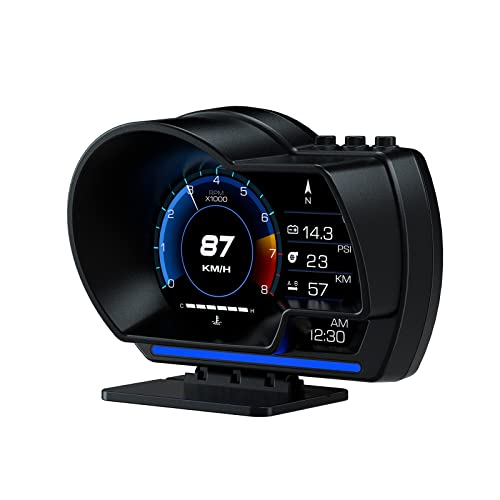
- Ten switchable interfaces
- Dashboard or windshield mounting
- GPS fallback for speed
Best For: Flexible placement and customizable readings
Best for Broad Data

- Over 20 listed parameters
- OBD2 and GPS modes
- Three mounting options
Best For: Drivers seeking varied live data and alerts
Best Compact Mount

- 1.8-inch display
- Dashboard or A-pillar placement
- Eight switchable interfaces
Best For: Drivers prioritizing a small, repositionable gauge
Best for Diagnostics

- Reads and clears trouble codes
- Adjustable driving alerts
- Advanced data depends on vehicle PIDs
Best For: Drivers wanting gauge data and basic diagnostics
Best Windshield Projection
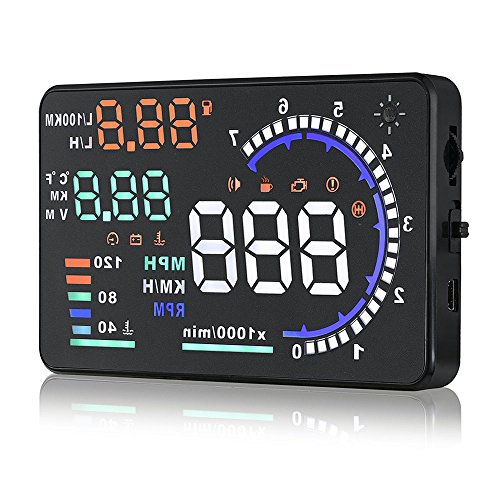
- Projects key driving data onto the windshield
- Includes anti-ghosting film and adjustable brightness
- Check extensive vehicle exclusions
Best For: Compatible gasoline vehicles needing windshield-projected gauges
Best Customizable Gauge

- OBD and GPS operating modes
- 3.6-inch LCD with 13 themes and gesture control
- OBD readings depend on vehicle compatibility
Best For: Drivers seeking a configurable dashboard gauge
Best for Fault-Code Checks

- Scans and clears engine fault codes in OBD mode
- GPS mode covers speed and trip data
- OBD mode has significant vehicle exclusions
Best For: Compatible post-2008 cars needing basic fault-code checks
Compact Dual-Mode Pick

- Switchable OBD2 and GPS modes
- Dashboard or A-pillar mounting
- Overspeed alert and auto brightness
Best For: Compact speed display with a GPS fallback
Large-Screen Data Pick
B3 5.5-Inch OBD2 Gauge Display

- 5.5-inch multi-data screen
- Speed, RPM, temperature, and trip readings
- Overspeed and fatigue reminders
Best For: Compatible vehicles needing a larger multi-data display
Best Simple Pick

- Projects onto windshield film
- Speed, temperature, trip, and voltage data
- Speed calibration and MPH/KM switching
Best For: Compatible gasoline vehicles needing windshield projection
Best for Flexible Viewing – wiiyii P6 OBD2 + GPS Gauge
The wiiyii P6 is an obd2 heads up display for drivers who want speed and vehicle data within easy view. Its adjustable bracket supports dashboard or windshield placement, while ten interfaces let you choose how information appears.
Best For: Drivers who want flexible mounting, multiple display layouts, and GPS speed as a fallback when OBD2 data is unavailable.
Pros:
- Combines OBD and GPS modes; GPS functions remain available if the vehicle lacks a supported OBD2 protocol.
- Shows speed, RPM, voltage, water temperature, and other vehicle data where supported.
- Automatically adjusts brightness and changes its ambient light from blue to red for an abnormal-driving alert.
Cons:
- Vehicle-specific readings require a compatible OBD2 connection.
- The 5.24 x 3.54 x 4.33-inch unit may take more mounting space than a compact display.
Choose the P6 if placement and interface choice matter as much as the readings themselves. Check your vehicle’s OBD2 support before counting on engine data.
Best for Broad Data – OBD2 GPS Dual-System HUD
This obd2 heads up display pairs OBD2 readings with a GPS option and offers customizable views for drivers who want more than speed alone. The supplied specifications list over 20 parameters, including RPM, water temperature, voltage, fuel consumption, and trip information.
Best For: Drivers who want a wide selection of driving data and mounting choices, including a GPS speed option for vehicles without compatible OBD2 access.
Pros:
- Offers OBD2 and GPS modes; the listing states OBD2 works with most post-2008 vehicles.
- Includes a rotating suction-cup bracket, console base, and adhesive tape.
- Provides overspeed and fatigue-driving warnings.
Cons:
- GPS mode does not provide OBD2-only engine readings.
- Its many available parameters may be unnecessary if you only need a speed display.
This is the data-heavy option of the group. Confirm OBD2 compatibility if engine information—not GPS speed—is your main reason for buying.
Best Compact Mount – wiiyii P8 Dual-System Display
The wiiyii P8 is a compact obd2 heads up display designed for dashboard or A-pillar placement. Its 1.8-inch screen offers eight switchable interfaces, with OBD2 and GPS modes for different driving needs.
Best For: Drivers who prefer a small display positioned on the dashboard or A-pillar rather than mounted to the windshield.
Pros:
- Compact 2.4 x 3 x 1.9-inch body weighs 125 g.
- Eight interfaces can display information such as speed, RPM, voltage, and water temperature.
- Includes Velcro and 3M tape for its stated placement options.
Cons:
- The 1.8-inch screen may be small for drivers who prefer larger numbers.
- OBD mode is the default; the listing says OBD mode works on most 2008-and-newer cars.
The P8 makes sense when mounting space is limited. Its smaller screen is the key trade-off, so consider how far it will sit from your usual driving position.
Best for Diagnostics – OBD2 + GPS Gauge Display
This obd2 heads up display adds trouble-code reading and clearing to its speed and vehicle-data views. Alongside OBD2 monitoring, it offers a GPS mode for speed and trip information when a vehicle does not support its OBD2 functions.
Best For: Drivers who want an in-car gauge that can also check trouble codes and show supported live engine data.
Pros:
- Reads and clears diagnostic trouble codes and displays live PID data.
- Offers adjustable alerts for speed, RPM, water temperature, and voltage.
- Includes OBD and USB cables plus a suction-cup mount and tape for flexible setup.
Cons:
- OBD functions require a compatible 2008-or-newer OBDII/EOBD vehicle; OBDI and JOBD are excluded.
- Advanced readings such as oil or transmission temperature depend on the PIDs your vehicle supports.
Pick this model if basic fault-code checks are useful alongside everyday driving information. Verify both vehicle protocol and supported PIDs before relying on its deeper engine readings.
Best Windshield Projection – A8 5.5-Inch OBD2 HUD
This obd2 heads up display projects speed, RPM, water temperature, voltage, and trip mileage onto your windshield. Its 5.5-inch display and included anti-ghosting reflective film make it a practical choice if you want driving data in your line of sight.
Best For: Drivers of compatible gasoline vehicles who want a windshield-projected display with straightforward alerts.
Pros:
- Plug-and-play setup for supported OBD II/EUOBD gasoline vehicles.
- Automatic or manual brightness adjustment for changing light conditions.
- Over-speed warning and ignition-synced automatic power on/off.
Cons:
- Excludes Dodge, Jeep, Mazda, Suzuki, French and Italian vehicles, and select Hyundai/Kia models.
- Requires windshield projection rather than offering a self-contained gauge screen.
Check the vehicle exclusions before buying: compatibility is the main trade-off for this otherwise focused windshield HUD.
Best Customizable Gauge – wiiyii P28 Dual-Mode Display
This obd2 heads up display is a dashboard-mounted gauge with a 3.6-inch LCD, OBD and GPS modes, and 13 display themes. Gesture-controlled interface switching and an adjustable rotating bracket give drivers more ways to tailor the setup.
Best For: Drivers who want a customizable gauge display with GPS speed information when OBD data is unavailable.
Pros:
- OBD mode offers vehicle data; GPS mode provides a broader vehicle-compatibility option.
- Displays speed, RPM, temperature, voltage, and other available metrics with configurable themes.
- Includes speed, temperature, and voltage alerts, plus acceleration and braking tests.
Cons:
- OBD functionality works with only some car models.
- Its standalone LCD is not a windshield projection.
Choose the P28 for display flexibility and added driving metrics, but verify OBD compatibility if ECU-based readings matter most.
Best for Fault-Code Checks – MH OBD2+GPS Display
This obd2 heads up display combines live driving readouts with the ability to scan and clear engine fault codes in OBD mode. It also offers a GPS mode for speed and trip information when a vehicle does not support its OBD connection.
Best For: Drivers of compatible post-2008 OBDII/EOBD cars who want driving data and basic fault-code functions in one display.
Pros:
- Reads live OBD data and scans or clears engine fault codes on supported vehicles.
- GPS mode supplies speed, altitude, direction, and trip information without compatible OBD data.
- Offers 10 interfaces, adjustable brightness, configurable alerts, and dashboard or windshield mounting.
Cons:
- OBD mode excludes diesel, hybrid, pickup, RV, and modified vehicles, plus listed brands including Jeep and Suzuki.
- On vehicles incompatible with its OBD protocol, only GPS functions are available.
Its diagnostic features are the differentiator, provided your vehicle meets the stated OBD requirements; otherwise, expect the narrower GPS feature set.
Compact Dual-Mode Pick – BY-J P8 3-Inch OBD2/GPS HUD
The BY-J P8 is an obd2 heads up display for drivers who want a small, flexible speed readout. It mounts on the dashboard or A-pillar trim and switches between OBD2 and GPS modes.
Best For: Drivers who want a compact display and a GPS fallback if their vehicle is not OBD2-compatible.
Pros:
- OBD2 mode shows speed alongside RPM, coolant temperature, fuel consumption, and voltage.
- GPS mode provides speed and compass information for vehicles that cannot use its OBD2 mode.
- Includes a preset overspeed alert and automatic screen brightness adjustment.
Cons:
- GPS mode does not provide the engine data available in OBD2 mode.
- The 3-inch screen may be too small for shoppers who prefer a large dashboard readout.
Choose this model for its mounting options and dual-mode flexibility; check OBD2 compatibility if engine data is a priority.
Large-Screen Data Pick – B3 5.5-Inch OBD2 Gauge Display
This B3 obd2 heads up display prioritizes an at-a-glance view of multiple vehicle readings on its 5.5-inch screen. It connects through OBD2 and includes driving alerts as well as automatic brightness adjustment.
Best For: Drivers with a compatible vehicle who want a larger display for engine data and driving reminders.
Pros:
- Shows readings including speed, RPM, water temperature, fuel consumption, trip time, trip distance, and voltage.
- Provides overspeed and water-temperature alerts, plus a fatigue reminder after more than four hours of driving.
- Offers automatic brightness adjustment with a manual adjustment option.
Cons:
- OBD2-only operation makes vehicle compatibility important to verify before buying.
- The 5.5-inch screen takes up more space than a compact HUD.
The B3 makes the most sense when you want several readings visible at once, but check the seller’s stated compatibility exclusions before ordering.
Best Simple Pick – Compact OBD2 Speed Projector
This obd2 heads up display projects information onto the windshield using reflective film rather than relying solely on a dashboard-facing screen. Its compact unit connects by OBD cable and displays speed alongside a small set of vehicle readings.
Best For: Drivers with a compatible gasoline vehicle who prefer a windshield-projected readout.
Pros:
- Displays speed, water temperature, single-trip information, and voltage.
- Includes an alarm function and automatic light sensing.
- Supports speed calibration and switching between kilometers and miles per hour.
Cons:
- Requires applying reflective film to the windshield and adjusting the projection angle.
- Stated compatibility is limited to specified OBD2-protocol gasoline vehicles; no GPS backup is listed.
Consider this option if windshield projection matters more to you than a broad feature list, and confirm your vehicle meets its stated fitment requirements.
How We Picked the Best Obd2 Heads Up Display
We organized the selected models around the decisions that matter most when buying a car HUD: OBD2-only versus OBD2/GPS operation, dashboard screen versus windshield projection, available driving data, and alert options. The product names identify features such as RPM, coolant temperature, voltage, and overspeed warnings, but a feature on the listing is not a guarantee that every car will report it. Check the seller’s compatibility details and return policy before ordering.
Quick Comparison: Which Type Fits Your Car?
Compact dashboard displays suit drivers who want a self-contained screen without projecting onto the glass. The BY-J P8 is listed as a 3-inch model with dashboard and A-pillar mounting options. Windshield projectors, such as the listed A8, put information on the windshield; check that the projected image will sit at a comfortable height in your vehicle. Dual OBD2/GPS models, including the MH and other dual-system options in this roundup, give you an alternative speed source when OBD2 support is limited. GPS speed may take time to acquire a signal and can differ from the vehicle’s indicated speed.
Key Buying Factors for an Obd2 Heads Up Display
Vehicle and Data Compatibility
An OBD2 connector alone does not confirm that a display will work with your vehicle. Check the model’s stated year, fuel type, and protocol support against your car. Speed and RPM are common priorities; fuel-consumption figures, coolant temperature, voltage, and fault information depend on what the vehicle and device can provide. If you mainly want speed in a car with uncertain OBD2 support, a dual-system unit is worth considering.
Placement and Day-To-Day Readability
Decide whether you prefer a screen on the dash, an A-pillar mount where supported, or a windshield projection. Consider sightline, reflections, dashboard space, and where the cable will run to the diagnostic port. For projected displays, verify whether a reflective film is needed or included; some windshields can create a doubled image. Adjustable brightness and a legible layout matter more than having the most figures on screen.
Alerts and Setup
Overspeed, temperature, voltage, and fatigue reminders can be useful if their thresholds are adjustable and the alerts are easy to understand. Check how the unit powers down with your car, especially if the OBD2 port remains powered while parked. Confirm included cables and mounts before buying.
Who Should Buy Which Obd2 Heads Up Display?
Choose a simple OBD2 gauge if your vehicle is confirmed compatible and you want speed plus a few engine readings. Pick a compact dashboard model when windshield projection would be distracting or awkward to position. Consider an OBD2/GPS display if you need flexibility across vehicles or want GPS-based speed as a fallback. Choose a windshield projector only if you can position it clearly without obstructing your view. In every case, prioritize a readable display and verified compatibility over a longer feature list.