A Ford Super Duty can have faults beyond the reach of a basic code reader. Depending on the truck and repair, you may need access to ABS, transmission, body or diesel-related modules—not just engine codes.
These eight scanners offer different levels of system coverage, active testing and service functions. The right choice depends on your truck’s model year and the specific job you need to do.
Best 8 Dealer Level Scan Tool for Ford Super Duty Picks for 2026
Wireless Workshop Pick
ANCEL DS500BT Bidirectional Scanner

- Wireless VCI and 7-inch tablet
- 3,000+ listed active tests
- Verify truck-specific functions
Best For: Mobile diagnostics around a compatible truck
Compact Handheld Pick
Innova 5610 Bidirectional Scan Tool

- Enhanced live data on supported vehicles
- Select active controls and relearns
- Check year-specific coverage
Best For: Handheld diagnostics with verified vehicle coverage
Phone-Based Pick
VDIAGTOOL D200 Bluetooth Scanner

- Bluetooth iOS and Android use
- 26 included service functions
- Heavy-duty trucks excluded
Best For: Confirmed-compatible light trucks, not unverified Super Duty applications
Essential-Service Pick
FOXWELL NT726 All-System Scanner
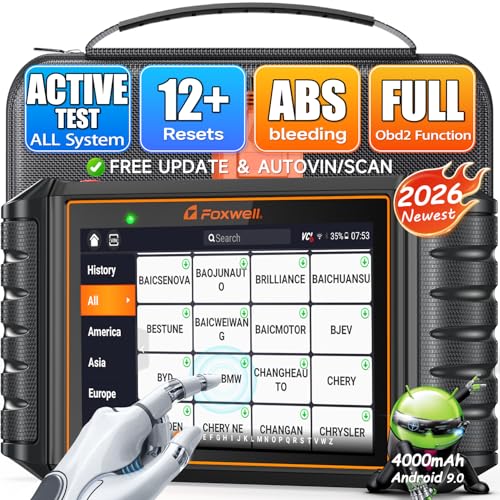
- All-system diagnostics and active tests
- 12 listed maintenance functions
- Confirm Super Duty-specific coverage
Best For: Common diagnostics and verified service functions
Best All-System Pick
ANCEL FX6100 Bidirectional Scan Tool

- Supported all-system scans and live data
- Active tests and 20 service functions
- Lifetime free Wi-Fi updates; no ECU programming
Best For: Owners seeking broad diagnostics and supported component tests
Best Ford-Specific Pick

- Ford-focused diagnostics; F-250/F-350 listed
- Battery registration and routine resets
- Lifetime free updates
Best For: Ford owners handling system scans and routine maintenance
Best Multi-Brand Tablet
Autel MK808Z Bidirectional Scanner

- All-system diagnostics and active tests
- 28+ listed service functions
- Broad brand coverage; verify Ford functions
Best For: Users diagnosing a Super Duty alongside other makes
Best Four-System Option
ANCEL FX6000 Bidirectional Scanner

- Engine, ABS, SRS, and transmission scans
- Supported active tests and 15 service functions
- Lifetime free Wi-Fi updates
Best For: DIYers focused on four systems plus component testing
Wireless Workshop Pick – ANCEL DS500BT Bidirectional Scanner
If you’re shopping for a dealer level scan tool for Ford Super Duty, the ANCEL DS500BT offers broad diagnostics and active testing in a wireless tablet. Its listed features are useful, but confirm coverage for your truck’s year, engine, and required function before ordering.
Best For: Owners and technicians who want to run supported tests while moving between the cab and engine bay.
Pros:
- Scans available systems, including engine, transmission, ABS, and body modules.
- Offers 3,000+ active tests and 28+ service functions across supported vehicles.
- Wireless VCI, live-data recording, reports, and lifetime free updates.
Cons:
- Specific active tests and relearns vary by vehicle and system.
- Not intended for 24V heavy-duty trucks.
This is a practical choice when wireless access and repair verification matter most. Don’t assume its broad feature list includes every Super Duty procedure; check the exact truck and function first.
The Innova 5610 is a compact option for shoppers seeking a dealer level scan tool for Ford Super Duty without moving to a tablet-style scanner. It combines enhanced live data with select bidirectional controls and relearn procedures, though those capabilities are not universal.
Best For: Buyers who prefer a vehicle-powered handheld and can verify their truck’s coverage before purchase.
Pros:
- Displays enhanced engine, transmission, ABS, and SRS live data on supported vehicles.
- Provides select component commands and special reset or relearn functions.
- Includes free updates, no subscription fees, and US-based technical support.
Cons:
- Bidirectional controls and relearns depend on make, model, and year.
- Its 3.5-inch screen offers less viewing space than a tablet.
Use Innova’s Coverage Checker to confirm the exact Super Duty year and job you need. Its handheld format is appealing, but the listing does not establish dealer-tool-equivalent Ford coverage.
The VDIAGTOOL D200 is worth examining if your search for a dealer level scan tool for Ford Super Duty centers on phone-based diagnostics. It advertises full-system scanning, active tests, and 26 included resets, but its stated coverage is for compatible OBD2 light trucks—not heavy-duty trucks.
Best For: Owners of a confirmed-compatible light-duty vehicle who want Bluetooth diagnostics on iOS or Android.
Pros:
- Offers bidirectional component tests and all-system diagnostics on supported vehicles.
- Includes 26 reset and relearn functions with lifetime free core software updates.
- Provides optional paid upgrades for additional resets and J2534 pass-thru capability.
Cons:
- Heavy-duty trucks are explicitly excluded; verify any Super Duty application by VIN.
- Advanced resets and J2534 capability require separate purchases; OE programming software is not included.
This is not a safe assumption for Super Duty coverage based on the listing alone. Get written VIN-and-function confirmation before considering it, especially for diesel service or programming work.
For buyers comparing a dealer level scan tool for Ford Super Duty, the FOXWELL NT726 offers a mix of all-system diagnostics, active tests, and 12 listed maintenance functions. Ford is among the advertised brands, but individual procedures still depend on vehicle compatibility.
Best For: Buyers who want a standalone scanner focused on diagnostics, actuation tests, and common service resets.
Pros:
- Reads and clears codes across supported vehicle systems and displays live data.
- Can activate supported components, including ABS-related parts and injectors.
- Lists 12 service functions, AutoVIN, PDF reports, and lifetime updates.
Cons:
- The 12-function service menu may not cover a specialized Ford procedure.
- Ford brand support does not guarantee coverage for a particular Super Duty year or system.
The NT726 suits routine troubleshooting when its supported functions match your truck. Verify the exact year, powertrain, and required actuation or reset before treating it as an alternative to a dealer tool.
Best All-System Pick – ANCEL FX6100 Bidirectional Scan Tool
If you want a dealer level scan tool for Ford Super Duty troubleshooting, the ANCEL FX6100 offers broad diagnostic access without claiming dealer programming capability. It scans supported vehicle systems, displays live data, and runs active tests to help you check components before replacing parts. Confirm your truck’s year and the specific functions you need with ANCEL before buying.
Best For: Super Duty owners who want all-system diagnostics and supported active tests in one tool.
Pros:
- Scans supported systems including engine, transmission, ABS, SRS, and BCM.
- Runs supported component tests and offers 20 service functions.
- Includes lifetime free Wi-Fi software updates with no annual renewal fee.
Cons:
- Active tests and service functions vary by vehicle.
- Does not support ECU coding or programming.
The FX6100 is a practical choice for diagnosing faults across multiple modules, but it is not a substitute for a Ford factory programming tool. Update its firmware on first use to access the complete advertised feature set.
Best Ford-Specific Pick – ANCEL FD500 Ford Scanner
For shoppers searching for a dealer level scan tool for Ford Super Duty maintenance, the ANCEL FD500 is a Ford-focused alternative to a generic code reader. Its listed Ford coverage includes the F-250 and F-350, with diagnostics for systems such as engine, ABS, transmission, HVAC, and 4WD. Verify coverage for your truck’s exact year and the function you need.
Best For: Ford owners who prioritize system scans and routine service functions over bidirectional testing.
Pros:
- Ford-focused system diagnostics with listed F-250 and F-350 coverage.
- Includes battery registration, oil reset, throttle/KAM reset, and EPB maintenance mode.
- Offers lifetime free updates and basic OBD2 functions.
Cons:
- The supplied features do not establish bidirectional active-test capability.
- Specific system and service-function support depends on the vehicle.
The FD500 makes the most sense when Ford-specific maintenance is your priority. If you need to command components during diagnosis, choose a tool with confirmed active tests for your particular Super Duty.
Best Multi-Brand Tablet – Autel MK808Z Bidirectional Scanner
If your search for a dealer level scan tool for Ford Super Duty also needs to cover other vehicles, the Autel MK808Z offers all-system diagnostics, live-data views, and bidirectional active tests. Its listed functions include more than 28 service and reset procedures, but you should confirm the exact coverage for your Super Duty’s year before relying on a particular test or relearn.
Best For: Multi-vehicle users who want broad diagnostic functions and a tablet-style interface.
Pros:
- Provides all-system scans, live data, and supported active tests.
- Lists 28+ service functions, including BMS reset and DPF regeneration.
- Supports a wide range of brands and lists CAN FD and DoIP compatibility.
Cons:
- The supplied notes do not verify individual Super Duty tests or model-year coverage.
- Broad diagnostic access should not be mistaken for confirmed Ford factory programming.
The MK808Z is appealing when one scanner must serve several makes. For a Ford-specific job, check Autel’s vehicle-function coverage rather than assuming every listed service function works on your truck.
Best Four-System Option – ANCEL FX6000 Bidirectional Scanner
The ANCEL FX6000 is worth considering if you want some of the testing associated with a dealer level scan tool for Ford Super Duty repairs but mainly work on engine, ABS, SRS, and transmission issues. It combines diagnostics for those four systems with supported active tests and 15 listed service functions. Check your truck’s year and engine for function-level compatibility before purchase.
Best For: DIYers focused on four key systems who also want supported component tests and maintenance resets.
Pros:
- Offers bidirectional tests for compatible components such as fans, injectors, and ABS pumps.
- Includes 15 listed service functions, including ABS bleeding and DPF regeneration.
- Provides lifetime free Wi-Fi updates without an annual subscription fee.
Cons:
- Diagnostic coverage is limited to four listed systems rather than all vehicle modules.
- Active tests and resets vary by make, model, and year.
Choose the FX6000 when its four-system coverage matches your likely repair work. If you need to investigate body or other modules beyond those listed, an all-system scanner is the more appropriate starting point.
How We Picked the Best Dealer Level Scan Tool for Ford Super Duty
We focused on tools that offer more than generic emissions-code reading, including Ford-oriented diagnostics, all-system scanning, bidirectional controls or service functions. Those descriptions are a starting point, not proof that every feature works on every Super Duty. Coverage can vary by model year, engine, module and software version, so check the maker’s vehicle-specific function list before ordering.
Quick Comparison: Match the Tool to the Job
For Ford-focused ownership, start by checking the ANCEL FD500’s supported functions against your truck. For broader multi-vehicle diagnostics, compare the ANCEL DS500BT, FX6100 and FX6000, FOXWELL NT726, Innova 5610 and the listed Autel model by their confirmed module access and active tests. The VDIAGTOOL D200 is the phone-based option for buyers who prefer a Bluetooth adapter to a handheld screen. Product labels such as “all-system” or “bidirectional” do not guarantee identical capabilities across these choices.
Key Buying Factors for a Dealer-Level Scan Tool for Ford Super Duty
Confirm Your Exact Truck
Check the year, engine and relevant modules against the manufacturer’s coverage information. A function available on one F-250 or F-350 may be absent on another. If the seller cannot confirm the task you need—such as an ABS bleed, injector-related function or battery registration—ask the manufacturer before buying.
Separate Diagnostics, Active Tests and Programming
Reading a fault code tells you where to investigate; live data helps you test a hypothesis; bidirectional control lets you command certain components when supported. Service resets are different again. None of these features automatically means a tool can perform Ford factory programming, configure replacement modules or handle every security-protected procedure. If those jobs are your priority, verify the required hardware, software access and subscriptions first.
Check Update and Ownership Costs
Compare the price after any included update period, not just the purchase price. Look for clear terms covering software updates, app access, supported devices and technical support. For a Bluetooth scanner, also confirm phone compatibility and whether core functions require an internet connection.
Who Should Buy Which Dealer Level Scan Tool for Ford Super Duty?
If you mainly maintain one Ford truck, a Ford-focused scanner may be the simplest fit—provided it covers your year and planned repairs. If you work on multiple makes, prioritize a broad-coverage bidirectional tool with verified Super Duty functions rather than choosing by the number of advertised resets. Choose a phone-based model when portability matters and you are comfortable using an app. For true dealer-level work, make a checklist of the exact procedures you need and buy only after confirming them in writing; a capable aftermarket diagnostic tool is not necessarily a substitute for Ford’s factory service setup.