A bidirectional scanner can do more than read trouble codes: it may command supported components, run service procedures, and help narrow down a Silverado fault before you replace parts.
The catch is that “GM compatible” does not guarantee every test works on your truck. These 10 picks span GM-focused tools, standalone tablets, and app-based scanners, so you can match the features to your Silverado’s model year and the work you actually do.
Best 10 Bidirectional Scan Tool for Chevy Silverado Picks for 2026
Full-System Pick

- All-system diagnostics and live data
- Active tests and 28+ service functions
- Wired connection
Best For: Broad diagnostics with a wired connection
Guided-Repair Pick

- OEM and OBD2 live data where supported
- Selected active tests and relearns
- Updates and US-based support
Best For: Owners who want diagnostic guidance and support
Phone-Based Pick

- Bluetooth app for iOS and Android
- Active tests and 26 included resets
- Advanced features cost extra
Best For: Phone-based diagnostics and routine maintenance
Core-Systems Pick

- Engine, transmission, ABS, and SRS
- Active tests and 12 listed resets
- Standalone touchscreen and buttons
Best For: Four-system troubleshooting without a phone
Multi-Brand Pick

- Active tests and four-system diagnostics
- 15 listed service functions
- Lifetime software updates
Best For: Owners servicing a Silverado and other makes
GM-Focused Pick

- GM full-system diagnostics
- Actuator tests for supported components
- One-touch Auto VIN on supported GM models
Best For: Chevrolet and GMC owners troubleshooting multiple systems
GM Handheld Pick

- GM full-system scans and active tests
- Service resets and relearns
- Lifetime updates and dual-band Wi-Fi
Best For: GM owners wanting a compact, updateable handheld
Best Wireless Pick
XTOOL A30D Bidirectional Scanner

- Phone-based wireless diagnostics
- All-system scans and eight-PID live data
- 19 listed service functions
Best For: Silverado owners who want wireless, phone-based troubleshooting
Best All-System Handheld
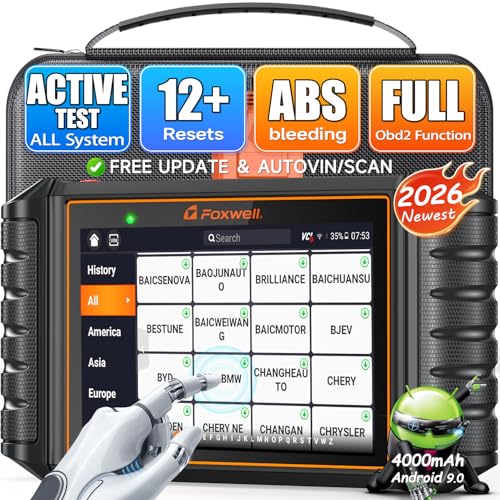
- Diagnostics across 22+ systems
- Supported ABS, window, and injector tests
- 12 listed resets and PDF reports
Best For: Broad module diagnostics and vehicle-supported active tests
Best Four-System Option

- Engine, ABS, SRS, and transmission scans
- Supported component activation tests
- 15 listed service functions
Best For: DIY work centered on four major vehicle systems
Full-System Pick – Autel MaxiCOM MK808S
If you want a bidirectional scan tool for Chevy Silverado diagnostics that goes beyond engine codes, the wired Autel MaxiCOM MK808S is worth considering. It offers all-system diagnostics, live and freeze-frame data, active tests, and more than 28 service functions, though Silverado-specific coverage must be confirmed.
Best For: DIYers and shops that need broad system access and a wired connection.
Pros:
- All-system diagnostics cover engine, transmission, ABS, body, and electrical systems.
- Supports active tests for components such as fans, lights, and pumps where compatible.
- Includes service functions such as oil reset, battery management, and injector-related functions.
Cons:
- Supported tests and service functions vary by vehicle; verify your Silverado’s year and configuration.
- Wired connection offers less freedom to move around the truck than a Bluetooth tool.
The MK808S is the broader diagnostic choice here, but confirm the exact Silverado functions you need before buying.
Guided-Repair Pick – Innova 5610
The Innova 5610 is a bidirectional scan tool for Chevy Silverado owners who want live data alongside repair support. It combines OBD2 and available OEM data, selected active tests and relearn procedures, plus access to the RepairSolutions2 app. Check Innova’s coverage checker for your truck before relying on a particular function.
Best For: Owners who value repair guidance and US-based technical support.
Pros:
- Enhanced live data can include engine, transmission, ABS, and SRS systems.
- Selected bidirectional controls include fuel-pump operation and electronic parking-brake retraction.
- Includes updates without subscription fees and access to ASE-certified support.
Cons:
- Active tests, relearns, and OEM data are not universal across vehicles.
- Listed vehicle support is primarily 1996–2023; confirm coverage for newer Silverados.
Choose the 5610 for its support ecosystem, provided Innova confirms the tests you need on your specific Silverado.
Phone-Based Pick – VDIAGTOOL D200
For a phone-based bidirectional scan tool for Chevy Silverado maintenance, the Bluetooth VDIAGTOOL D200 offers all-system diagnostics, active tests, and 26 included reset and relearn functions. It works with iOS and Android, but the seller advises confirming compatibility by VIN.
Best For: DIYers who prefer using a phone and want core maintenance functions without a recurring fee.
Pros:
- Supports active tests of components such as fuel pumps, injectors, and cooling fans where available.
- Includes 26 reset and relearn functions, including oil reset, ABS bleeding, and tire-size reset.
- Core diagnostics and included resets come with lifetime software updates.
Cons:
- Additional advanced resets and J2534 programming access require separate paid upgrades.
- Programming requires OE software that is not supplied; Silverado function coverage must be verified.
The D200 offers a flexible starting point, but budget for upgrades only if you confirm they support the job you plan to do.
Core-Systems Pick – THINKCAR THINKSCAN 662
The THINKCAR THINKSCAN 662 is a standalone bidirectional scan tool for Chevy Silverado shoppers focused on engine, transmission, ABS, and airbag diagnostics. Its touchscreen, physical buttons, active tests, and 12 listed service functions make it a practical alternative to a phone-based scanner; verify model-year coverage and specific tests first.
Best For: Home mechanics who want a dedicated scanner for four core systems and common service tasks.
Pros:
- Diagnoses engine, transmission, ABS, and SRS systems.
- Offers active tests for components such as ABS pumps, radiator fans, and fuel injectors where supported.
- Includes a 6.2-inch touchscreen, physical buttons, and lifetime free updates.
Cons:
- Advertised in-depth diagnostics focus on four systems, not full-system coverage.
- AutoVIN may not work on some older vehicles; confirm Silverado-specific active tests and resets.
Its dedicated screen and focused feature set suit routine troubleshooting, as long as four-system diagnostics cover your needs.
Multi-Brand Pick – MUCAR 632 Elite
If you want a bidirectional scan tool for Chevy Silverado but also work on other makes, the MUCAR 632 Elite pairs active tests with engine, ABS, SRS, and transmission diagnostics. Its 6.2-inch touchscreen gives you more room to review codes and live data.
Best For: Owners maintaining a Silverado and other vehicles who want service functions without software-update subscription fees.
Pros:
- Supports active tests, AutoVIN, and live-data graphing.
- Includes 15 listed service functions, such as ABS bleeding, oil reset, and throttle adaptation.
- Lifetime software updates have no subscription fee.
Cons:
- Confirm Silverado-specific active tests and service functions before buying.
- AI code analysis requires an internet connection and current software; lifetime updates do not cover third-party manufacturer access services.
This is the flexible choice if you need one scanner for more than a GM vehicle. Check coverage for your Silverado’s year and the particular tests you plan to run.
GM-Focused Pick – LAUNCH Creader Elite X500
For a bidirectional scan tool for Chevy Silverado, the LAUNCH Creader Elite X500 takes a GM-focused approach. It scans available vehicle modules, displays live data, and can command supported components such as cooling fans, lights, and fuel pumps for troubleshooting.
Best For: Chevrolet and GMC owners who want full-system diagnostics and active tests in a compact handheld scanner.
Pros:
- Reads and clears codes across supported modules, including ECM, TCM, ABS, and BCM.
- Offers active tests and maintenance functions such as ABS bleeding, throttle relearn, and oil reset.
- Provides one-touch Auto VIN for supported 2006-and-newer GM models and Wi-Fi updates.
Cons:
- Active tests and service functions vary by model and year; verify your Silverado by VIN.
- The 4-inch screen is smaller than the MUCAR’s 6.2-inch display.
Choose the X500 if GM-specific troubleshooting is your priority. Confirm the exact actuator commands and resets you need before ordering.
GM Handheld Pick – LAUNCH Creader Elite V3.0
The LAUNCH Creader Elite V3.0 is another bidirectional scan tool for Chevy Silverado shoppers who prefer a GM-oriented handheld. It combines full-system scans with active tests that can command supported parts, including windows, lights, fuel-pump relays, and cooling fans.
Best For: GM owners seeking a compact scanner with active tests, service functions, and lifetime software updates.
Pros:
- Supports codes, live data, module information, and active tests on available systems.
- Lists service options including oil reset, ABS bleeding, throttle relearn, and battery registration.
- Offers lifetime free updates, dual-band Wi-Fi, and AutoVIN for supported 2006-and-newer GM vehicles.
Cons:
- Functions depend on the vehicle; check your Silverado’s VIN for specific coverage.
- Certain newer GM vehicles may require a compatible CAN FD adapter.
The V3.0 has a useful mix of diagnostics and maintenance tools, but its value depends on whether your truck supports the tests you need. Check compatibility and any adapter requirements first.
Best Wireless Pick – XTOOL A30D Bidirectional Scanner
If you want a bidirectional scan tool for Chevy Silverado troubleshooting without buying a dedicated handheld unit, the XTOOL A30D turns a compatible phone into a wireless diagnostic display. Its GM coverage and supported functions should be checked against your Silverado’s VIN before purchase.
Best For: Silverado owners who prefer phone-based diagnostics and a broad range of maintenance functions.
Pros:
- Bidirectional tests can command supported components, including fuel pumps, wipers, and windows.
- All-system diagnostics and live data display up to eight PIDs at once.
- Includes 19 listed service functions and free lifetime app updates.
Cons:
- Requires a compatible Android or iOS phone.
- Active tests and service functions vary by vehicle; confirm Silverado-specific support first.
The A30D makes the most sense if wireless access and service-function breadth matter more to you than an integrated screen. Check the exact tests you need for your truck, not just general GM compatibility.
Best All-System Handheld – FOXWELL NT726 Scanner
The FOXWELL NT726 is a bidirectional scan tool for Chevy Silverado buyers who want to investigate more than engine codes. It offers all-system diagnostics, active tests, and service functions, but you should verify which of those features work on your Silverado’s specific year and configuration.
Best For: Owners and repairers who want broad module coverage plus supported component tests.
Pros:
- All-system diagnostics cover more than 22 vehicle systems, according to the supplied specifications.
- Active tests include supported ABS, window, and injector operations.
- Provides 12 listed maintenance functions, AutoVIN, PDF reports, and free lifetime updates.
Cons:
- Individual active tests and resets depend on vehicle compatibility.
- The stated actuation-test count does not establish which tests a particular Silverado supports.
Choose the NT726 when diagnosing multiple modules is the priority. Before ordering, confirm the Silverado-specific active tests and resets you expect to use.
Best Four-System Option – ANCEL FX6000 Scanner
The ANCEL FX6000 is a bidirectional scan tool for Chevy Silverado owners focused on engine, ABS, airbag, and transmission problems. It combines diagnostics for those four systems with supported active tests and maintenance functions rather than claiming full all-system coverage.
Best For: Experienced DIYers who need four-system diagnostics and a self-contained scanner.
Pros:
- Active tests can command supported injectors, cooling fans, ABS pumps, and EVAP valves.
- Includes 15 listed resets and relearns, with availability varying by vehicle.
- Offers Auto VIN, live data, a 6.2-inch touchscreen, and free lifetime Wi-Fi updates.
Cons:
- Enhanced diagnostics are limited to engine, ABS, SRS, and transmission rather than all vehicle systems.
- Silverado-specific tests and service functions require compatibility confirmation.
The FX6000 is a practical choice when its four diagnostic systems cover your likely jobs. If you need access to additional Silverado modules, consider an all-system model instead.
How We Picked the Best Bidirectional Scan Tool for Chevy Silverado
We focused on tools marketed with bidirectional controls and compared their stated GM coverage, system access, service functions, interface, and update model. The lineup includes GM-focused scanners, general-purpose handhelds and tablets, and Bluetooth options. A feature listed for a scanner is not necessarily available on every Silverado: access can change by model year, engine, module, and software version. Treat manufacturer coverage charts and supported-function lists as the final check before purchase.
Quick Comparison: Which Type Fits Your Garage?
GM-focused standalone tools: The LAUNCH Creader Elite X500 and Creader Elite V3.0 are natural starting points if your Silverado is the main vehicle you service. Check the exact truck-year coverage and included functions for each version.
Multi-brand standalone tools: The Autel MK808S, THINKSCAN 662, MUCAR 632 Elite, XTOOL A30D, FOXWELL NT726, and ANCEL FX6000 suit buyers who also maintain other vehicles. Compare the specific active tests you need rather than relying on the number of advertised reset functions.
App-based or guided options: The VDIAGTOOL D200 offers a phone-based workflow, while the Innova 5610 emphasizes repair guidance. Confirm device compatibility, account requirements, and any feature or update costs.
Key Buying Factors for a Bidirectional Scan Tool for Chevy Silverado
Verify Your Exact Truck and Intended Test
Start with your Silverado’s year, engine, and vehicle identification number (VIN). Ask whether the tool can access the relevant module and perform the specific command you need—not just read its codes. Depending on the truck and scanner, useful tests might involve ABS components, cooling fans, fuel-system controls, or other actuators. A broad “bidirectional” label does not confirm each one.
Match Service Functions to Your Repairs
Oil-life resets and brake-service functions are useful for routine work, but they are different from active tests. If you need battery registration, steering-angle calibration, injector-related procedures, or transmission functions, verify that the function applies to your exact Silverado. Do not assume a scanner replaces GM programming equipment or grants access to every protected module.
Check Ongoing Costs and Ease of Use
Compare the price after any included update period, subscription requirements, and whether previously installed functions remain usable when updates expire. A standalone scanner keeps diagnostics off your phone; a Bluetooth model is easier to store but depends on its app and compatible device. Clear menus and readable live-data graphs matter when you are tracing an intermittent fault.
Who Should Buy Which Bidirectional Scan Tool for Chevy Silverado?
Choose a GM-focused LAUNCH option if you mainly work on Silverados and its coverage chart confirms your needed tests. Pick a multi-brand standalone tool if you maintain a mixed garage and want a dedicated screen. Consider the D200 if you prefer phone-based diagnostics, or the Innova 5610 if repair guidance matters as much as commanding components. For any choice, verify your truck and must-have function before treating a long feature list as a guarantee.