A car head-up display can put speed, navigation, and driving alerts closer to your line of sight, helping you check essential information without looking down at the dashboard. The best models range from simple GPS speedometers to feature-rich units with wireless CarPlay and Android Auto.
We compared 10 car head-up displays under $300 for compatibility, readability, installation, alert features, and everyday value. Use the guide below to narrow your choices based on your vehicle, preferred data source, and desired level of connectivity.
Best 10 Car Head Up Displays Under 300 Picks for 2026
Best GPS Value

- GPS+BDS positioning with 10Hz refresh
- Large MPH display with auto brightness
- USB plug-and-play; no OBD port needed
Best For: Simple GPS speed display for USB-equipped vehicles
Best Connected Display

- Wireless CarPlay and Android Auto
- 800×268 color anti-glare screen
- Voice commands, calls, media, and GPS alerts
Best For: Connected commuting and road-trip convenience
Best Safety Alerts

- Three adjustable overspeed alert thresholds
- GPS+BDS positioning with 10Hz refresh
- USB plug-and-play with auto brightness
Best For: Simple speed projection with configurable warnings
Best All-in-One Upgrade

- Wireless CarPlay and Android Auto
- GPS data plus overspeed warnings
- OBD and cigarette-lighter power options
Best For: Feature-rich HUD use across varied vehicle types
Best OBD-II Value

- Plug-and-play OBD-II/EUOBD compatibility
- Shows speed, engine data, voltage, and temperatures
- 3-inch HD display with reduced reflections
Best For: Drivers wanting detailed vehicle data from a compatible car
Best All-Vehicle Flexibility
- GPS operation works across many vehicle types
- Supports CarPlay and Android Auto
- Includes OBD and cigarette-lighter power cables
Best For: Drivers needing broad compatibility and smartphone integration
Best Compact GPS Speed Display

- Compact USB plug-and-play design
- 10 Hz GPS+BDS positioning with speed calibration
- Adjustable brightness and overspeed alerts
Best For: Drivers wanting a simple, readable GPS speed display
OBD-II Feature-Rich HUD
5.5-Inch Multi-Color Car Display
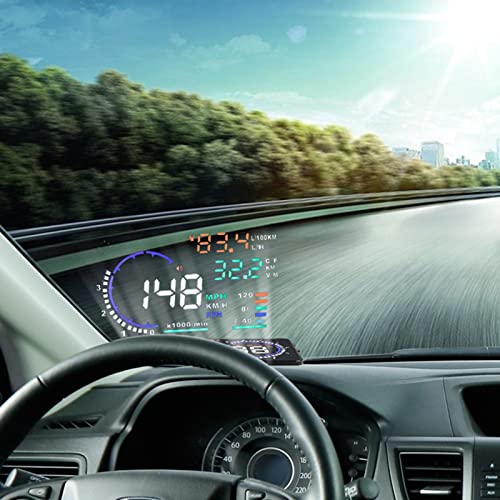
- Shows speed plus engine, temperature, voltage, fuel, mileage, and fault data
- Manual and automatic brightness adjustment
- Overspeed, fatigue, temperature, voltage, and shift reminders
Best For: Drivers wanting extensive OBD vehicle information
GPS Precision Pick
- Dual GPS and BDS positioning with 10Hz refresh
- USB plug-and-play design without OBD requirements
- Large MPH readout with automatic brightness
Best For: USB-equipped vehicles needing simple GPS speed display
Minimalist Speed Display

- Simple GPS-projected MPH speed display
- Automatic brightness adapts to ambient light
- Includes Type-C cable, reflective film, and 3M sticker
Best For: Drivers wanting an uncluttered speed-only HUD
Best GPS Value – K1 USB Car HUD
For drivers comparing car head up displays under 300, this compact K1 focuses on clear GPS speed projection without requiring an OBD connection. Its large display, automatic brightness adjustment, and USB plug-and-play setup make it a straightforward choice for everyday driving.
Best For: Drivers who want a simple GPS speedometer HUD for a USB-equipped car, truck, or motorcycle.
Pros:
- Uses GPS+BDS positioning with a 10Hz refresh rate and support for up to 32 satellites.
- Large MPH display with anti-reflective metal shading for easier viewing.
- Automatic brightness adjustment helps accommodate daytime and nighttime driving.
- USB-powered design does not require an OBD port.
Cons:
- GPS speed can vary by approximately 0.6–1.8 MPH.
- Signal may be affected in tunnels, underground garages, heavy rain, fog, or vehicles with metallic windshield film.
The K1 is a focused, low-complexity option rather than a connected infotainment system. It is a good fit when accurate-enough GPS speed and easy installation matter more than calls, navigation, or media features.
Best Connected Display – 2.99-Inch Wireless HUD
Among car head up displays under 300, this 2.99-inch model stands out for combining a color HUD with wireless CarPlay and Android Auto. It is designed for drivers who want speed, navigation, calls, and media in one dashboard-mounted unit.
Best For: Commuters and road-trip drivers seeking a connected color display with smartphone integration.
Pros:
- Supports wireless CarPlay and Android Auto, plus Bluetooth calling and media streaming.
- 800×268 anti-glare display with adaptive brightness for strong daylight readability.
- Provides real-time speed, call, and GPS alerts with voice-command support.
- Non-slip silicone base is designed to resist shifting on rough roads and during braking.
Cons:
- Its connected functions depend on a compatible smartphone and wireless setup.
- The supplied notes do not specify software update support.
This is the most feature-rich option in the group for drivers who want more than a speedometer. Its dashboard mounting and smartphone connectivity make it particularly appealing for daily commutes and longer trips.
Best Safety Alerts – Universal USB HUD
For shoppers researching car head up displays under 300, this universal USB HUD adds adjustable overspeed alerts to a simple projected speed display. It requires no technical installation and is designed for vehicles with a USB interface.
Best For: Drivers who want a basic speed HUD with visible overspeed warnings and adjustable MPH/KMH modes.
Pros:
- Triple overspeed alert settings can be adjusted to 80, 120, or 150 km/h.
- GPS+BDS positioning and a 10Hz refresh rate support responsive speed tracking.
- Automatic brightness adjustment and a built-in sun visor help with visibility.
- USB plug-and-play design is compatible with vehicles equipped with a USB interface.
Cons:
- It is primarily a speed and alert display without the connected features of a CarPlay HUD.
- Speed fine-tuning may be needed if the HUD and vehicle readings differ.
The CN-YC103038-WT is a practical pick for drivers who value configurable warnings and straightforward installation. Its speed adjustment feature is useful, but it also means setup may require comparing the display with the vehicle’s speed reading.
Best All-in-One Upgrade – HUD-3 Car Display
This HUD-3 is a versatile contender among car head up displays under 300, pairing GPS driving data with wireless CarPlay and Android Auto. It offers multiple power options and broad vehicle compatibility, making it suitable for cars that may not support OBD connectivity.
Best For: Drivers who want a larger all-in-one HUD with smartphone integration and flexible power options.
Pros:
- Displays GPS speed, travel time, one-way distance, total mileage, and overspeed warnings.
- Supports wireless CarPlay and Android Auto.
- Includes both an OBD cable and a cigarette-lighter power cable.
- Automatic brightness adjustment and an anti-glare lens support daytime and nighttime readability.
Cons:
- Wireless setup requires Bluetooth and Wi-Fi to remain enabled on the phone.
- The supplied dimensions are substantially larger than those listed for the compact GPS HUDs.
- It automatically shuts down after 10–15 minutes when parked, then uses vibration-activated wake-up through the OBD cable.
With its dual power options and broad compatibility, the HUD-3 is a strong choice for drivers seeking expanded functionality. Expect a more involved setup than a basic USB speedometer, especially when configuring wireless smartphone features.
Best OBD-II Value – Dual-Mode Car HUD
If you want car head up displays under 300 with broad OBD-II coverage, this plug-and-play model provides a useful set of driving and vehicle alerts without requiring a complicated installation. Its 3-inch high-definition screen is designed for readable information and reduced reflections.
Best For: Drivers seeking an OBD-II/EUOBD display with vehicle-status information and adjustable measurement units.
Pros:
- Automatically adapts to compatible OBD-II or EUOBD vehicles.
- Displays speed, engine speed, water temperature, battery voltage, and configurable alerts.
- Supports kilometer/mile and Celsius/Fahrenheit switching.
- Turns on and off with the vehicle while also retaining manual control.
Cons:
- Compatibility is limited to vehicles with OBD-II or EUOBD support.
- The supplied notes do not identify wireless or GPS operation.
This is a practical choice when you want more than a basic speed display and your vehicle supports the required diagnostic connection. Confirm OBD-II/EUOBD compatibility before buying.
Best All-Vehicle Flexibility – GPS CarPlay HUD
Among car head up displays under 300, this model stands out for GPS-based operation, phone connectivity, and dual power options. It is designed for a wide range of vehicles, including older, modified, and new-energy cars that may not support OBD connections.
Best For: Drivers who want GPS speed, CarPlay and Android Auto functionality, and flexible installation across different vehicle types.
Pros:
- Uses GPS positioning rather than vehicle-specific OBD compatibility.
- Supports CarPlay and Android Auto with Bluetooth and Wi-Fi pairing.
- Includes both OBD and cigarette-lighter power cables.
- Operates from -20°C to 75°C and includes overheat protection with automatic cooling.
Cons:
- Phone setup requires Bluetooth and Wi-Fi to remain enabled.
- OBD power shutdown and wake-up behavior may take 10–15 minutes after parking.
- Its larger listed dimensions may use more dashboard space than compact HUDs.
Choose this unit if broad compatibility and smartphone integration matter more than a simple OBD readout. Its included power options also make installation easier across varied vehicle setups.
Best Compact GPS Speed Display – K4 Car HUD
For shoppers comparing car head up displays under 300, this compact GPS speedometer focuses on clear speed readings and simple USB installation. Its dual-mode GPS+BDS reception, adjustable brightness, and speed calibration provide useful flexibility for everyday driving.
Best For: Drivers who want a small, easy-to-install speed HUD with overspeed alerts and switchable units.
Pros:
- Uses GPS+BDS reception with a 10 Hz refresh rate and support for up to 32 satellite signals.
- USB plug-and-play power simplifies setup.
- Offers MPH/KM/H switching, speed calibration, and adjustable brightness.
- Provides a custom overspeed alert and large, anti-reflective speed display.
Cons:
- GPS reception may be affected in tunnels, underground garages, severe weather, or behind metallic windshield film.
- It focuses primarily on speed and alerts rather than broader vehicle diagnostics.
This is a sensible pick for drivers who prefer a lightweight, dedicated GPS speed display instead of a more feature-heavy dashboard device. Its compact form and USB power are especially convenient for quick installation.
OBD-II Feature-Rich HUD – 5.5-Inch Multi-Color Car Display
If you want car head up displays under 300 with more than basic speed information, this OBD-II/EUOBD model adds vehicle data and driver alerts. It can show speed, engine speed, water temperature, battery voltage, fuel-consumption figures, mileage, and fault codes, provided your vehicle is compatible.
Best For: Drivers seeking an OBD-connected HUD with vehicle diagnostics, configurable brightness, and overspeed reminders.
Pros:
- Displays a broad range of vehicle information, including speed, temperature, voltage, consumption, mileage, and fault codes.
- Offers manually adjustable brightness plus automatic brightness adjustment while driving.
- Includes overspeed, high-temperature, low-voltage, shift, and fatigue-driving reminders.
- Automatically powers on and off with the vehicle.
Cons:
- Requires a compatible OBD II or EUOBD vehicle.
- Its feature-rich display may be more information than drivers wanting a minimal speed-only HUD.
This is the most comprehensive option of the three for drivers who want dashboard-style data in their sightline. Confirm OBD compatibility before buying, then use the adjustable display and warning features to tailor the experience.
GPS Precision Pick – Large-Font USB Car HUD
Among car head up displays under 300, this GPS-based unit is a straightforward choice for vehicles without a compatible OBD port. It uses GPS and BDS positioning, connects to satellites for speed tracking, and runs from a standard 5V USB connection.
Best For: Drivers who want a plug-and-play windshield speed display that works with most USB-equipped cars, trucks, and motorcycles.
Pros:
- Uses dual-mode GPS and BDS positioning with a stated 10Hz refresh rate.
- USB-powered and does not require an OBD connection.
- Large MPH display with anti-reflective shading for easier reading.
- Automatically adjusts brightness using a built-in light sensor.
Cons:
- GPS speed can vary by approximately 0.6–1.8 MPH.
- Satellite reception may be affected in tunnels, underground garages, poor weather, or behind metallic windshield film.
- Speed is displayed in MPH by default.
This model makes sense when compatibility and simple installation matter more than displaying engine or diagnostic data. Its GPS operation avoids OBD concerns, but it performs best where satellite signals are clear.
Minimalist Speed Display – M2 Auto-Brightness HUD
For shoppers comparing car head up displays under 300, the M2 focuses on the essentials: a simple projected MPH readout with minimal visual clutter. It uses GPS, connects through the included Type-C cable, and automatically adjusts brightness for daytime and nighttime viewing.
Best For: Drivers who prefer a compact, speed-only HUD with simple installation and an uncluttered windshield view.
Pros:
- Minimalist design presents only the key speed information.
- Automatic light sensing adjusts brightness for changing conditions.
- Plug-and-play Type-C connection with included cable, reflective film, and 3M sticker.
- Includes a one-year warranty and stated after-sales support.
Cons:
- Displays MPH speed only rather than broader vehicle or diagnostic data.
- Requires GPS signal acquisition before speed appears.
- GPS performance may be less dependable where satellite signals are obstructed.
The M2 is a good fit for buyers who value an unobtrusive display over extra metrics. Its automatic brightness and included mounting accessories simplify setup, while the speed-only layout keeps the projected information easy to scan.
How We Picked the Best Car Head Up Displays Under 300
We evaluated these displays around the factors that matter most during daily driving: information accuracy, screen visibility, setup requirements, vehicle compatibility, and useful safety alerts. We also considered whether a unit relies on GPS, OBD-II/EUOBD data, a USB connection, or a paired smartphone.
Because product specifications can vary by seller and vehicle, confirm the included cable, supported data protocol, projection method, and phone compatibility before ordering. A display that works well in one car may not support every feature in another.
Quick Comparison
| Type | Best For | What to Check |
|---|---|---|
| GPS HUD | Broad vehicle compatibility | Satellite startup time and signal accuracy |
| OBD-II/EUOBD HUD | Live vehicle data | Whether your car supports the required port and protocol |
| CarPlay/Android Auto HUD | Navigation and connected driving | Phone, app, and wireless connection support |
| USB plug-and-play HUD | Simple installation | Power source, display brightness, and cable placement |
Key Buying Factors for Car Head-Up Displays Under 300
Vehicle Compatibility
GPS-based models are generally the easiest to move between vehicles because they calculate speed independently. OBD-II models can provide more vehicle-specific information, but compatibility depends on the car’s diagnostic port and communication standard. Check whether the product supports OBD-II, EUOBD, or both.
Display and Visibility
Look for adjustable brightness, clear numerals, a stable windshield image, and a built-in light shield or glare control. Multi-color displays can make warnings easier to notice, while larger screens may be easier to read but take up more dashboard or windshield space.
Features and Alerts
Decide which information you actually need. Speed, overspeed warnings, mileage, navigation, and vehicle data are common features. CarPlay and Android Auto models add navigation and media access, but they usually require a compatible smartphone and more setup than a basic speedometer.
Installation and Reliability
USB plug-and-play units are convenient, while OBD-II models may require routing a cable from the diagnostic port. Choose a secure mounting position that does not block your view, and verify that the unit remembers settings after the vehicle is switched off.
Who Should Buy Which Car Head Up Displays Under 300?
Choose a GPS HUD if you want the simplest broadly compatible solution or drive multiple vehicles. Pick an OBD-II model if you want vehicle-linked readings and know your car supports the required protocol. A CarPlay or Android Auto HUD is better for drivers who want navigation and smartphone integration in one display. For a basic, low-effort installation, a USB plug-and-play model is usually the most practical choice.
Among car head-up displays under 300, the right option is less about buying the most feature-packed unit and more about matching the display to your vehicle, phone, driving habits, and preferred data source.