A good head-up display can keep essential driving information closer to your line of sight, helping you check speed, navigation cues, and vehicle data without repeatedly looking down at the dashboard. For long road trips, that added convenience can make changing roads and unfamiliar routes easier to manage.
This roundup compares 10 car HUD options, from compact GPS speedometers to larger displays with OBD2, CarPlay, Android Auto, and overspeed alerts. The right choice depends on your vehicle, preferred features, installation method, and how much information you want visible while driving.
Best 10 Car Head Up Displays for Road Trips Picks for 2026
Best GPS Accuracy

- 10Hz dual-mode GPS and BDS positioning
- Large anti-reflective MPH display
- USB plug-and-play with auto brightness
Best For: Simple, readable speed tracking on road trips
Best Minimalist Design

- Simple speed-only windshield projection
- Large font with automatic brightness
- Type-C plug-and-play installation
Best For: Drivers who want a compact, uncluttered HUD
Best Road-Trip Features

- Shows speed, trip, clock, time, and compass
- Overspeed and fatigue-driving reminders
- MPH/KM/H, calibration, and auto on/off
Best For: Long journeys requiring extra trip information
Best Display Versatility

- More than ten adjustable display combinations
- 5.5-inch borderless screen
- Rotating bracket and USB plug-and-play setup
Best For: Drivers wanting customizable road-trip data views
Connected Road-Trip Navigator
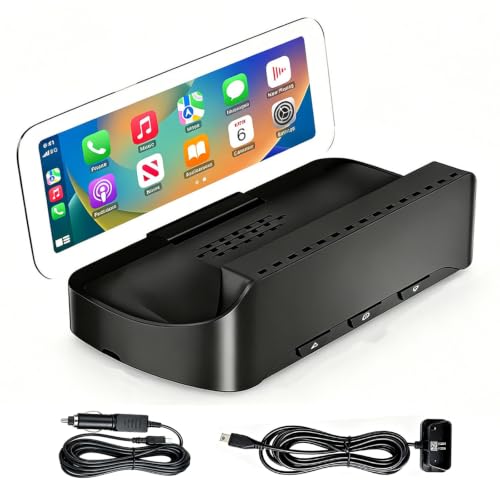
- Wireless Apple CarPlay and Android Auto
- Anti-glare HD display with automatic brightness
- Dual power cables and stable adjustable mount
Best For: Drivers adding wireless smartphone features to older vehicles
Simple Safety Speedometer

- GPS speed and compass direction
- Overspeed and fatigue alerts
- Automatic and manual brightness control
Best For: Drivers wanting a minimal speed-focused windshield display
All-Vehicle Smart Display
VIVIHUD V3-SE Wireless Car HUD

- Wireless CarPlay and Android Auto
- HD anti-reflection display
- Bluetooth audio and hands-free calling
Best For: Older vehicles, RVs, and drivers wanting a portable smart display
Best GPS Simplicity
- GPS and BDS positioning with 10Hz refresh
- Large MPH display with auto brightness
- USB-powered without an OBD port
Best For: Drivers wanting a simple speed display with broad compatibility
Best Connected Upgrade

- Supports CarPlay and Android Auto
- Includes OBD and cigarette-lighter power cables
- Overheat protection and wide vehicle compatibility
Best For: Drivers wanting smartphone connectivity and flexible installation
Best Vehicle Data

- Large display with automatic brightness
- Shows speed, RPM, temperature, voltage, and fuel use
- Adds OBD2 diagnostics and vehicle alerts
Best For: Compatible vehicle owners who want speed and engine data together
Best GPS Accuracy – K1 Car HUD
For drivers comparing car head up displays for road trips, the K1 emphasizes fast GPS updates, clear speed projection, and simple USB-powered installation. Its large MPH readout and automatic brightness adjustment are practical for changing daylight conditions.
Best For: Road-trippers who want a straightforward, readable GPS speed display without using the vehicle’s OBD port.
Pros:
- Dual-mode GPS and BDS positioning with a 10Hz refresh rate and support for up to 32 satellites
- Large, anti-reflective speed display designed for windshield projection
- Automatic brightness adjustment for daytime and nighttime driving
- USB 5V plug-and-play setup works with most vehicles, trucks, and motorcycles with a USB port
Cons:
- GPS speed can vary slightly from the dashboard by about 0.6–1.8 MPH
- Signal may be affected in tunnels, underground garages, heavy rain or fog, and vehicles with metallic windshield film
The K1 is a focused choice for long drives when you mainly need a prominent, GPS-based speed reading. It avoids extra trip functions, but its large display and simple setup keep the road-trip experience uncomplicated.
Best Minimalist Design – M2 GPS HUD
The M2 is a compact option among car head up displays for road trips, projecting only essential speed information in a simple white display. Its plug-and-play Type-C connection and automatic brightness control make it easy to add without complicated installation.
Best For: Drivers who prefer a distraction-minimizing speed-only HUD with a compact design.
Pros:
- Minimal display presents the primary speed data without cluttering the driver’s view
- Large projected font is designed for quick reading
- Automatic light sensing helps keep the display visible by day without being glaring at night
- Includes a Type-C USB cable, reflective film, 3M sticker, and English manual
Cons:
- Speed appears only after the unit establishes a GPS satellite signal
- Provides a simpler speedometer-focused feature set rather than multiple trip metrics
The M2 makes sense for road-trip drivers who want less information, not more. Its uncluttered interface can be appealing if a basic speed projection and easy setup are your main priorities.
Best Road-Trip Features – Multi-Function GPS HUD
For shoppers seeking feature-rich car head up displays for road trips, this 5V GPS HUD adds more than speed. It can show the clock, driving time, tripmeter, and compass, while adjustable alarms and brightness controls support longer journeys.
Best For: Long-distance drivers who want trip information, configurable alerts, and speed calibration in one windshield display.
Pros:
- Displays speed, clock, driving time, tripmeter, and compass data
- Programmable overspeed alarm and fatigue reminder for extended drives
- Supports MPH or KM/H and includes a speed calibration function
- USB plug-and-play power with automatic on/off and 11 manual brightness levels plus auto mode
Cons:
- The display requires a stable GPS lock before speed and compass information becomes available
- Reflective film may be needed to improve readability in strong daylight glare
- Users may need to calibrate the reading if it differs slightly from the dashboard
This model is a strong fit when a road-trip HUD should provide useful journey data and reminders rather than speed alone. Its broader feature set also means more settings to configure than a minimalist display.
Best Display Versatility – G12 Multifunction HUD
The G12 stands out among car head up displays for road trips with multiple interface layouts and a broad set of driving metrics. Its GPS and Beidou dual-mode chip, large borderless screen, and rotating bracket give drivers flexibility in both information display and placement.
Best For: Road-trippers who want numerous data views, adjustable layouts, and flexible mounting options.
Pros:
- GPS and Beidou dual-mode positioning is designed for faster satellite searching
- Offers more than ten display combinations with speed, time, mileage, direction, and other data
- Includes overspeed and fatigue-driving reminders
- USB plug-and-play setup includes a 360-degree rotating bracket for different mounting positions
Cons:
- Its larger 5.5-inch body may take more dashboard space than compact HUDs
- The many display combinations may require more setup to find a preferred layout
- GPS-based functions depend on satellite reception
The G12 is suited to drivers who want to tailor what they see during long trips. It offers more flexibility than a basic speed HUD, although its larger form and wider feature set may be unnecessary for users seeking a minimal display.
Connected Road-Trip Navigator – Wireless CarPlay HUD-V3
For drivers comparing car head up displays for road trips, the HUD-V3 combines wireless smartphone connectivity with navigation, calls, music, and a high-definition anti-glare display. It mounts on the dashboard and can use either an OBD or cigarette-lighter power cable.
Best For: Road trippers who want wireless CarPlay or Android Auto in an older vehicle without replacing the factory stereo.
Pros:
- Supports wireless Apple CarPlay and Android Auto for maps, calls, messages, music, Siri, and Google Assistant.
- Anti-glare display with automatic brightness is designed for daytime, cloudy, and nighttime driving.
- Adjustable viewing angle and high-friction silicone base help keep the unit stable on turns, braking, and uneven roads.
- Plug-and-play setup is designed for sedans, SUVs, sports cars, trucks, and other vehicles.
Cons:
- The image appears on the unit’s anti-glare lens rather than directly on the windshield.
- The projection is invisible while wearing sunglasses.
- The OBD cable provides power only and does not read raw vehicle data.
This is the most feature-rich option of the three, particularly for travelers who want smartphone navigation and audio in one dashboard-mounted display. Be prepared to configure Bluetooth audio through the vehicle if you want sound from its speakers.
Simple Safety Speedometer – M1 Windshield GPS HUD
If you want car head up displays for road trips without a crowded interface, the M1 focuses on the essentials: GPS-based speed, travel direction, overspeed alerts, and fatigue reminders. Its compact design plugs into the vehicle by USB and projects a simple readout onto the windshield.
Best For: Drivers who prefer a minimal windshield display with speed and basic safety alerts rather than smartphone functions.
Pros:
- Displays GPS speed and compass direction in MPH or KM/H.
- Overspeed and fatigue-driving alarms provide audible reminders during longer drives.
- Automatic brightness adjusts for changing daylight conditions, with manual brightness control also available.
- Compact plug-and-play setup includes a USB cable, reflective film, and anti-slip mat.
Cons:
- The unit must acquire GPS satellites before it can display speed.
- Satellite search can be slower in garages, dense buildings, under overpasses, or with certain metal window films.
- Its simple display does not provide smartphone navigation, calls, or music features.
The M1 is a straightforward choice for travelers who want speed and direction visible near eye level without adding a full infotainment system. For reliable startup, allow extra satellite-acquisition time when leaving enclosed or built-up areas.
All-Vehicle Smart Display – VIVIHUD V3-SE Wireless Car HUD
The VIVIHUD V3-SE is a practical pick among car head up displays for road trips when you want wireless phone integration without modifying the vehicle. Its HD anti-reflection screen supports CarPlay, Android Auto, screen mirroring, Bluetooth audio, and hands-free calling.
Best For: Drivers of older cars, SUVs, pickups, vans, RVs, or other vehicles that lack built-in CarPlay.
Pros:
- Provides wireless Apple CarPlay and Android Auto for maps, music, calls, messages, and voice assistants.
- HD anti-reflection display is designed for visibility in daylight, tunnels, rain, and at night.
- Supports screen mirroring, Bluetooth music streaming, hands-free calls, and app synchronization.
- Portable plug-and-play installation works with an adjustable display and non-slip base.
Cons:
- The supplied notes do not specify whether the OBD connection reads vehicle data or only supplies power.
- Phone integration requires connecting a compatible iPhone or Android device.
- The unit adds a separate dashboard display rather than replacing the vehicle’s original screen.
This model offers a broad feature set for road-trip convenience, especially in vehicles without factory smartphone integration. Its combination of wireless connectivity, audio support, and a stable adjustable mount makes it a flexible portable upgrade.
Best GPS Simplicity – Plug-and-Play Car HUD
For drivers comparing car head up displays for road trips, this GPS-based model keeps the essentials easy to see without requiring an OBD connection. It displays real-time speed in a large font and uses automatic brightness adjustment for changing light conditions.
Best For: Drivers who want a simple, USB-powered speed display for cars, trucks, or motorcycles.
Pros:
- Dual-mode GPS and BDS positioning with a 10Hz refresh rate.
- Large MPH display with anti-reflective metal shading.
- USB 5V plug-and-play power and broad vehicle compatibility.
- Automatic brightness adjustment for daytime and nighttime driving.
Cons:
- GPS accuracy can vary by approximately 0.6–1.8 MPH.
- Signal may be affected in tunnels, garages, heavy weather, or behind metallic windshield film.
This is a straightforward choice for road trips when you mainly need a readable speed projection and easy installation. Its GPS operation avoids vehicle-specific OBD compatibility concerns, though it depends on a clear satellite signal.
Best Connected Upgrade – CarPlay and Android Auto HUD
Among car head up displays for road trips, this model is suited to drivers who want a more connected setup. It supports CarPlay and Android Auto, includes overspeed alerts, and offers multiple power options for a wide range of vehicles.
Best For: Drivers seeking a versatile HUD with smartphone connectivity, broad vehicle compatibility, and flexible power options.
Pros:
- Supports CarPlay and Android Auto connectivity.
- Includes OBD and cigarette-lighter power cables.
- Designed for sedans, SUVs, trucks, RVs, pickups, older vehicles, and new-energy cars.
- Includes overheat protection and operates from -20°C to 75°C.
Cons:
- Requires Bluetooth and Wi-Fi setup for the HUD connection.
- The OBD power cable automatically shuts down after parking and uses vibration sensing to wake.
- Its larger body may occupy more dashboard space than compact speed-only displays.
This is the most feature-oriented option of the three, especially for road-trip vehicles that need smartphone integration or flexible installation. Setup is still designed to be plug and play, but the connectivity process is more involved than a basic GPS speedometer.
Best Vehicle Data – 5.5-Inch OBD2 HUD
For road trips where more than speed matters, this 5.5-inch HUD provides a broad view of vehicle information. It combines a large display with OBD2 data such as RPM, water temperature, voltage, and fuel consumption, plus speed and diagnostic alerts.
Best For: OBD2-compatible vehicle owners who want speed, engine data, and diagnostic information in one display.
Pros:
- Large 5.5-inch HD screen with automatic brightness adjustment.
- Displays speed, RPM, water temperature, voltage, and fuel consumption.
- Provides overspeed and voltage alerts.
- Can read fault information and support failure detection and code clearing.
Cons:
- Requires a compatible OBD2 or EOBD vehicle, generally widely used after 2003.
- Offers more information than drivers who only want a basic speed display may need.
- OBD2 data features depend on the vehicle’s supported protocols.
This model makes the most sense for drivers who value vehicle monitoring during long journeys. Its OBD2 connection adds useful data and diagnostic functions, but buyers should confirm compatibility before choosing it over a GPS-only unit.
How We Picked the Best Car Head Up Displays for Road Trips
We focused on features that matter during extended highway driving: readable speed projection, dependable GPS or OBD2 data, simple installation, broad vehicle compatibility, and useful navigation or smartphone integration. We also considered display size, power options, overspeed alerts, travel-direction information, and whether the unit is better suited to a minimalist setup or a connected driving experience.
Because specifications and compatibility can vary by vehicle and seller, verify the listed connection type, supported operating systems, speed units, and included cables before ordering.
Quick Comparison
| Type | Best For | What to Check |
|---|---|---|
| GPS speedometer HUD | Simple speed and direction data | GPS signal, update speed, and windshield visibility |
| OBD2 display | Vehicle data and gauge information | OBD2 compatibility and cable placement |
| CarPlay or Android Auto HUD | Navigation and smartphone connectivity | Phone compatibility, Bluetooth, and app support |
| Large-screen HUD | Drivers who prefer bigger text | Dashboard space, glare, and mounting position |
Key Buying Factors for Car Head-Up Displays for Road Trips
Connection and Vehicle Compatibility
GPS-based models are generally easier to move between vehicles because they do not need access to the car’s diagnostic system. OBD2 models may show more vehicle information, but compatibility can vary, particularly with older vehicles, electric cars, hybrids, or vehicles using nonstandard ports.
Readability and Projection
Choose a display with large, high-contrast numbers that remain legible in bright daylight. A windshield reflection film may improve visibility on some models, while others project directly onto the glass. Check whether the unit supports MPH, KM/H, adjustable brightness, and a viewing angle that suits your driving position.
Power and Installation
Plug-and-play power is convenient for travel, but cable length and routing still matter. Confirm whether the device uses USB, a 12-volt socket, OBD2, or more than one power option. Secure mounting is important so the display does not shift on uneven roads.
Information Overload
More features are not always better. For road trips, prioritize the information you will actually use—usually speed, navigation, and perhaps overspeed warnings. A crowded screen can be distracting, especially at night.
Who Should Buy Which Car Head Up Displays for Road Trips?
Choose a compact GPS HUD if you want quick installation, portability, and basic speed information. An OBD2 model is a better fit if you want access to additional vehicle readings and your car is confirmed compatible. Drivers who rely on phone navigation should consider a CarPlay or Android Auto display, while those who prefer easy reading may benefit from a larger screen with bold numerals.
For frequent travelers, look for automatic brightness, multiple power options, reliable mounting, and settings that can be adjusted before departure. Whichever model you choose, position it low enough to avoid blocking the road and set it up while parked.