The OBD2 Scanner Diagnostic Tool is aimed at drivers who want more than a basic code reader.
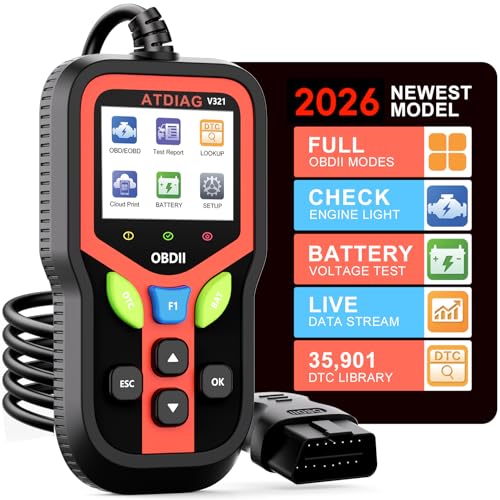
It combines fault-code reading, battery testing, live data, and report printing in one handheld unit.
OBD2 Scanner Diagnostic Tool Review Summary
If you want a straightforward way to diagnose check-engine alerts without moving up to a complicated shop tool, this scanner makes sense.
It is especially attractive for home mechanics, used-car owners, and anyone who wants a compact, plug-and-play way to check vehicle health before a repair visit.
The appeal is not just that it reads trouble codes.
The listing says it also clears codes, checks I/M readiness, shows real-time sensor data, runs EVAP tests, checks battery health, captures freeze frame data, and generates reports that can be printed or shared through the cloud.
That is a broad feature set for a tool positioned as easy to use.
What stands out most is the balance between accessibility and depth.
The scanner is built for standard OBDII vehicles since 1996 in the U.S., with wider compatibility claims for later models in Europe and Asia.
It also adds practical touches like shortcut keys, a color screen, multilingual support, and a rugged cable-and-case package that suggests it is intended for regular garage use, not just an emergency glovebox tool.
At the same time, this is still a listing-driven product.
The strongest reason to buy it is the convenience of having multiple diagnostic functions in one handheld unit, not a promise of professional-level vehicle-specific coding or advanced dealer diagnostics.
Review Scorecard
| Category | Score | Editorial rationale |
|---|---|---|
| Code reading and clearing | 9/10 | The listing clearly supports reading and clearing trouble codes, which is the core job most buyers need. |
| Live diagnostics | 8/10 | Real-time sensor data and freeze frame support make it more useful than a bare-bones reader. |
| Battery and system checks | 8/10 | Battery testing adds value for owners who want a broader pre-repair snapshot. |
| Ease of use | 9/10 | Plug-and-play operation, shortcut keys, and a color display point to a low-friction experience. |
| Compatibility | 8/10 | Broad OBDII support is useful, though buyers still need to verify vehicle fit before purchase. |
| Report handling | 7/10 | Cloud printing and QR-based sharing are practical, but the listing gives limited detail on workflow depth. |
| Build and portability | 8/10 | The heat-resistant cable and protective silicone case suggest decent everyday durability. |
Key Features and Specifications of OBD2 Scanner Diagnostic Tool
This scanner is built around standard OBDII diagnostics.
According to the listing, it works with most vehicles manufactured after 1996 in the U.S., after 2000 in Europe, and after 2008 in Asia, provided the vehicle has a standard 16-pin OBD2 port.
It focuses on the diagnostics that matter most to everyday owners and DIY users:
- Read and clear trouble codes
- Check I/M readiness status
- View real-time sensor data such as RPM, coolant temperature, and fuel pressure
- Run EVAP tests
- Check battery health
- Access freeze frame data
- Generate vehicle health reports
- Print or share results through cloud-based QR code printing
The listing also claims support for over 35,901 fault codes, which indicates a deeper reference library than many inexpensive readers.
It includes shortcut keys for quick access to reporting, DTC reading, and battery testing, plus tri-color indicator lights for basic status feedback.
Other practical details include:
- 2.4-inch color display
- 10-language support, including English, Spanish, French, and Portuguese
- Heat-resistant 3.0-foot insulated cable
- Rugged silicone case
- Operating temperature range from -22°F to 158°F
This is the kind of specification set that favors regular hands-on use.
It is portable, quick to connect, and broad enough to cover common owner-level diagnostic tasks without turning into a full tablet-style scan platform.
Pros and Cons of OBD2 Scanner Diagnostic Tool
Pros
- Covers the most useful everyday functions in one device: codes, live data, battery checks, readiness, and freeze-frame information.
- Easy to understand for beginners because the listing emphasizes plug-and-play operation and shortcut keys.
- Compatible with a wide range of OBDII vehicles, which makes it a sensible general-purpose option.
- Color display and multilingual support should reduce friction for casual users.
- Report printing and QR sharing are practical for keeping a record of issues before a repair.
- The rugged case and insulated cable suggest it is built for a garage, not just a drawer.
Cons
- The listing does not clearly position it as a professional-grade diagnostic platform for advanced system access.
- Buyers still need to verify vehicle compatibility, especially if their car is outside the stated model-year windows.
- Cloud printing and reporting sound useful, but the listing leaves some questions about software flow and setup.
- Because the product is broad rather than specialized, buyers looking for deep brand-specific coding will likely want a more advanced tool.
Taken together, the strengths are practical rather than flashy.
This is a scanner that is most appealing when you want quick answers, not a learning project or a feature-heavy tablet replacement.
Who Should Buy OBD2 Scanner Diagnostic Tool?
This is a strong fit for drivers who want a reliable check-engine tool they can keep in the garage or glove compartment.
It is also a good match for DIY mechanics who want to read codes, inspect live values, and capture a simple report before deciding whether a repair is urgent.
It should also appeal to used-car shoppers and owners who like to confirm basic health signals before buying parts or making a service appointment.
Battery testing and EVAP checks give it a bit more usefulness than the average code reader.
You should probably skip it if you already own a higher-end scan tool and need advanced manufacturer-level functions.
The listing supports broad OBDII diagnostics, but it does not strongly suggest deeper service functions, bi-directional controls, or vehicle-specific programming.
If your goal is simply to understand why a warning light appeared, this tool looks well matched.
If your goal is full diagnostic depth across many modules, you will likely want to move up-market.
OBD2 Scanner Diagnostic Tool for Everyday Vehicle Diagnosis
Why the live data matters
Live data is one of the main reasons this product is more useful than a basic code reader.
Being able to inspect RPM, coolant temperature, and fuel pressure helps you decide whether the car is showing a minor nuisance or something that deserves attention now.
Why battery testing adds value
Battery checks make the scanner more relevant outside of engine-light situations.
A weak battery can complicate starting and create confusing symptoms, so having that test in the same tool saves time and reduces guesswork.
Why the report features help
The QR printing and cloud report features are practical if you like to document problems, share them with a mechanic, or keep a record after clearing a code.
That kind of simple documentation can make repeat diagnosis easier later.
Why the rugged design matters
The heat-resistant cable, silicone case, and wide operating temperature range point to a tool meant for real garage conditions.
That is useful if you will keep it in the car, store it in a shop bag, or use it in hot and cold environments.
Alternatives to OBD2 Scanner Diagnostic Tool
If you want a different approach, a few Amazon-visible alternatives are worth comparing:
FIXD is often considered when buyers want a simpler app-first experience.
BlueDriver is a stronger comparison if you want a more established name in consumer diagnostics.
ANCEL and Autel both cover a wide range of scanner styles, from basic readers to more capable handheld tools, so they are useful references if you want to compare feature depth and interface style.
The right alternative depends on what you value most.
If you want easy code reading and quick checks, the current scanner is already in a practical zone.
If you want a richer ecosystem or a more recognizable scanner brand, the alternatives above are the first places I would compare.
Is OBD2 Scanner Diagnostic Tool Worth It?
Yes, if your priority is a capable, easy-to-use OBDII scanner for everyday diagnosis.
The feature set is broad enough to cover the checks most owners actually need, and the listing suggests a useful mix of readability, portability, and practical extras.
The biggest reason to buy it is that it does several jobs well enough for normal ownership: code reading, live data, battery testing, readiness checks, freeze-frame review, and report sharing.
That makes it a sensible value for people who want to diagnose before they replace parts or visit a shop.
It is less compelling if you need advanced professional functions or deep vehicle-specific access.
For everyone else, this looks worth considering as a general-purpose diagnostic tool.